A Guide to Accounts Receivable Automation Software
Accounts receivable automation software’s sole job is to manage the entire process of getting you paid, from the moment an invoice is created until the cash is in your bank, without you having to lift a finger. It’s like putting your collections on autopilot.
By Matthew Clarkson · December 1, 2025

Accounts receivable automation software’s sole job is to manage the entire process of getting you paid, from the moment an invoice is created until the cash is in your bank, without you having to lift a finger. It’s like putting your collections on autopilot.
We build this end to end: custom invoicing software that raises invoices in Xero the moment work completes and syncs payment status back to the job.
What Is Accounts Receivable Automation?
Picture running a busy local cafe. Your mornings are a whirlwind of brewing perfect flat whites and chatting with regulars. But come afternoon, you’re chained to a desk in the back office, drowning in paperwork. You’re manually creating invoices for corporate catering gigs, constantly refreshing your bank app to see who’s paid, and then drafting those awkward “just following up” emails to clients who are late.
It’s a grind. It’s slow. And it pulls you away from the parts of the business you actually enjoy.
This is exactly the problem accounts receivable (AR) automation software solves. It’s like having an incredibly sharp office manager who works 24/7 and never asks for a day off. This system automatically generates and fires off an invoice the second a job is done. It meticulously tracks every incoming payment, giving you a crystal clear view of your cash flow at all times.
Putting Collections on Autopilot
More importantly, it handles the uncomfortable task of chasing down late payments. You can set up a sequence of professional, friendly reminders that go out automatically. Maybe a gentle nudge a week after the due date, followed by a more direct message two weeks later. This consistent, polite pressure is often all it takes to get invoices paid faster, and it saves you from making those dreaded phone calls.
Suddenly, you’re free to focus on growing your cafe, creating new menu items, or just leaving work at a reasonable hour.
Getting a handle on AR automation is a cornerstone of effective accounts payable and receivable management, and the shift towards this kind of tech is undeniable, particularly here in Australia.
The market growth tells the story.
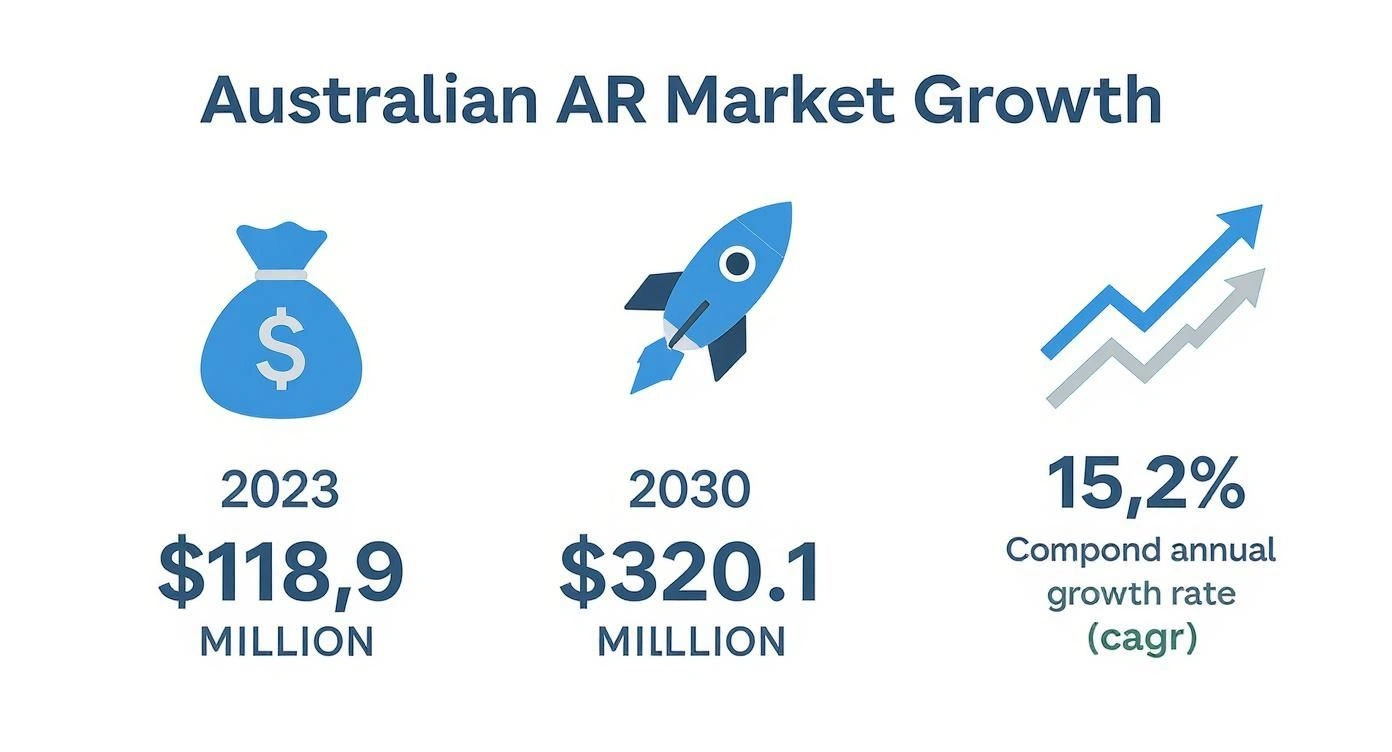
This powerful upward trend shows just how many businesses are turning to automation to strengthen their financial operations. The market, valued at around $118.9 million in 2023, is expected to surge to $320.1 million by 2030. That is a compound annual growth rate of 15.2% , a clear sign that manual AR processes are on their way out.
What Are the Real-World Benefits of Automating Invoices?
Beyond just getting your time back, shifting to accounts receivable automation software is like giving your business a daily financial health check. It is about swapping the constant stress of chasing payments for the confidence of knowing exactly when money will land in your account. This single change can fundamentally reset how you manage your cash flow.
Instead of your team making awkward follow up calls or getting lost in endless spreadsheets, the system sends out professional, timely reminders on your behalf. This consistency not only gets you paid faster, but it often improves your relationships with customers. They appreciate the clear communication and the simple ways to pay, which makes the whole process smoother for everyone.

A Clearer Financial Picture
One of the biggest wins is the dramatic drop in human error. We have all seen it, a simple typo on an invoice can cause payment delays and a frustrating chain of back and forth emails. Automation makes sure every detail is correct, every single time, so payments get processed without that needless friction. It is a small thing that massively boosts your professional image and builds trust.
On top of that, these platforms give you powerful, real time insights into your financial health. You can see at a glance who your best paying customers are and, just as importantly, which ones consistently lag behind.
Think of it as a financial GPS for your business. It doesn’t just show you where you are right now; it helps you predict cash flow, spot potential risks early, and make much smarter decisions about who to offer credit to in the future.
This kind of visibility isn’t just about making things run smoother. It is about building a more predictable and resilient business that can handle financial ups and downs with far more confidence. It also plays a key part in the bigger picture of streamlining operations for business efficiency.
More Than Just Invoices
To really understand the difference this makes, let’s compare the old way with the new.
| Task | Manual Process (The Old Way) | Automated Process (The New Way) |
|---|---|---|
| Invoice Creation | Manual data entry, prone to typos and errors. | Templates auto-populate with customer data, ensuring accuracy. |
| Sending Invoices | Attached to individual emails, one by one. | Sent instantly and automatically via preferred customer channels. |
| Payment Reminders | Relies on manual tracking and awkward phone calls. | Automated, scheduled follow-ups sent based on custom rules. |
| Payment Processing | Waiting for cheques or manual bank transfers. | Multiple online payment options integrated directly into the invoice. |
| Financial Reporting | Manually compiling data in spreadsheets, often outdated. | Real-time dashboards with up-to-the-minute cash flow visibility. |
As you can see, the shift isn’t minor. It touches every part of the collections cycle.
The benefits ripple out across your entire operation, creating a much more stable foundation for growth. This is far more than just an admin tool; it is a strategic asset.
- Improved Cash Flow: By speeding up your average payment time, you unlock cash that would otherwise be tied up in outstanding invoices.
- Better Customer Relationships: Professional, automated reminders and easy payment options remove the awkwardness from the payment process, creating a better experience for your clients.
- Reduced Administrative Burden: Freeing your team from manual data entry and follow-ups allows them to focus on high-value activities that actually grow the business.
- Data-Driven Decisions: Real-time dashboards and reports give you the clarity needed to forecast revenue and manage your finances proactively, not reactively.
At the end of the day, accounts receivable automation software isn’t about replacing people. It is about empowering them with the right tools to build a stronger, more financially sound business.
Key Features Your Business Actually Needs
Choosing the right accounts receivable automation software can feel a bit like trying to pick the best car. They all promise to get you from A to B, but the features inside are what make the journey smooth or stressful. Let’s cut through the noise and talk about the essentials your business will actually use day to day.
Think of these features as your non-negotiables, the core components that turn a basic tool into a powerful financial assistant. Not all software is created equal, so knowing what to look for is the key to making a smart investment.
Automated Invoicing and Delivery
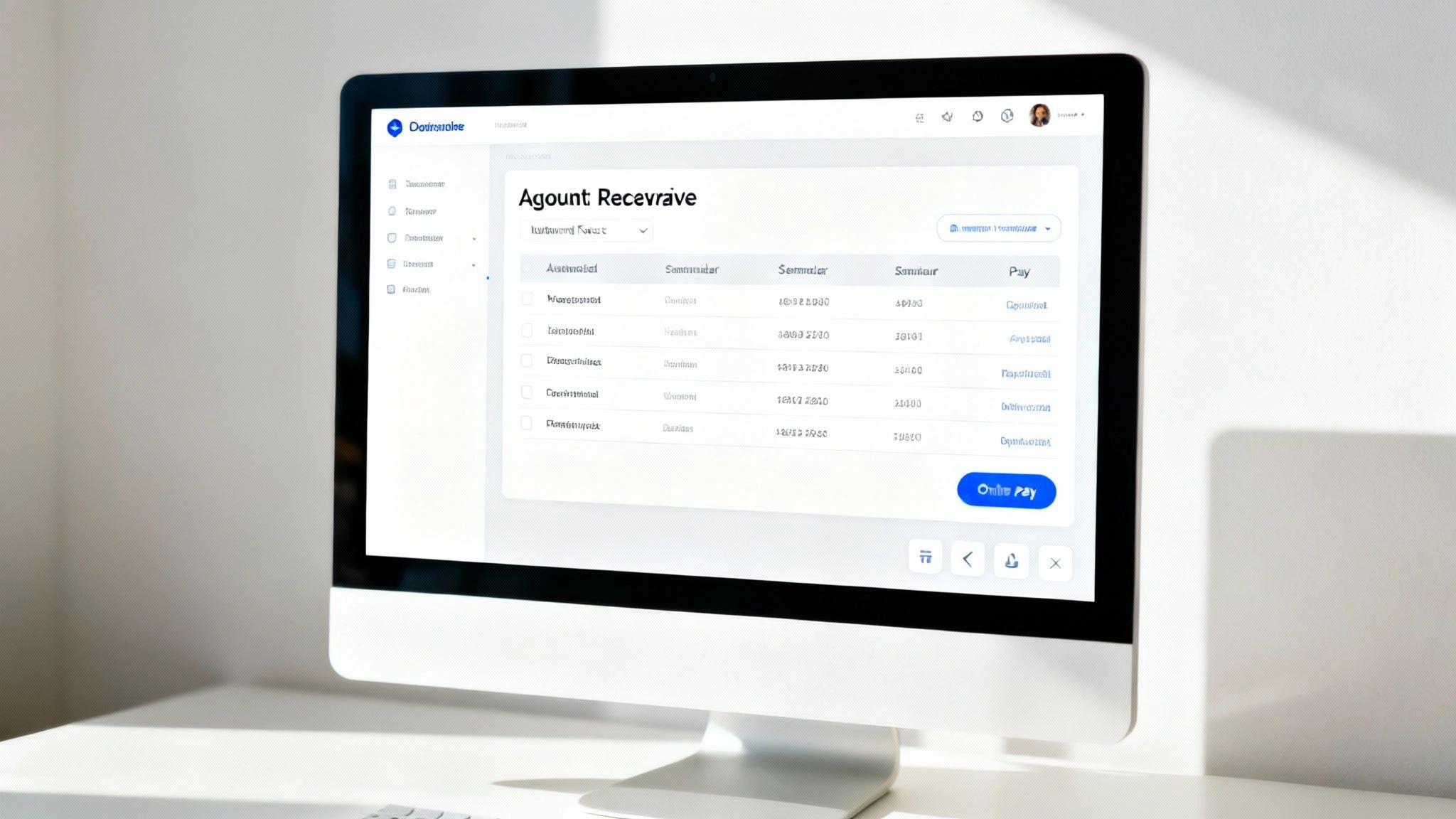
The absolute foundation of any good system is the ability to create and send invoices automatically. Imagine you finish a project, and the software instantly generates a perfect, professional looking invoice and emails it to your client without you even touching your keyboard.
This isn’t just about saving a few minutes. It is about eliminating the human delays that happen when invoicing relies on someone’s to do list. Prompt invoicing means you start the payment clock sooner, which is a direct boost to your cash flow. You can learn more about how this works in our guide to robotic process automation.
Customisable Reminder Workflows
This is where the real magic happens. Instead of manually chasing late payments, the software does the heavy lifting for you. A good platform lets you set up a series of polite, automated reminders that go out on a schedule you completely control.
For example, you could configure a workflow like this:
- A gentle nudge: Sent two days before the due date.
- A first reminder: Sent three days after the invoice is overdue.
- A firmer follow-up: Sent ten days after the due date.
You can customise the tone and timing of each message, so it always sounds like it’s coming from you. This maintains that all important customer relationship while still being incredibly effective at getting invoices paid.
Online Payment Portals
Making it easy for your customers to pay you is one of the fastest ways to get paid. An online portal is like a self-serve checkout for your invoices. Your clients simply click a link, view their outstanding bills, and pay immediately using their preferred method, whether that’s a credit card or a bank transfer.
This simple feature removes so much friction from the payment process. When paying an invoice is as easy as buying something online, you’ll be surprised how much faster the money arrives.
Seamless Accounting Integration
Your AR automation software shouldn’t be an island. It needs to connect seamlessly with the accounting software you already use, whether that’s Xero, MYOB, or something else.
This integration ensures that when an invoice is paid through the portal, it is automatically marked as cleared in your main accounting ledger. This saves your team from the headache of double data entry and keeps your financial records perfectly synchronised and accurate at all times. It’s a critical feature for maintaining a single source of truth for your finances.
How Australian SMEs Can Punch Above Their Weight with AR Automation
You do not need to be a corporate giant to get ahead with accounts receivable automation software. In fact, for Australian small and medium-sized enterprises (SMEs), this kind of technology can be a complete game changer. It levels the playing field, giving smaller businesses the financial muscle and organisation that was once only available to their larger competitors.
https://www.youtube.com/embed/9hvgkro6OcY?feature=oembed
One of the biggest headaches for any SME is the rollercoaster of inconsistent cash flow. It is like trying to drive a car with a sputtering engine, you never know when you will suddenly run out of fuel. Automation smooths out that ride by ensuring invoices go out on time and follow ups happen consistently, creating a far more predictable and reliable stream of money coming into the business.
That kind of consistency is the lifeblood of survival and growth.
More Time for What Actually Matters
For founders and their lean teams, time is the one resource you can never get back. Every hour spent manually keying in invoices or chasing late payments is an hour you aren’t spending talking to customers, refining your product, or drumming up new business. It is a classic case of being bogged down by admin.
Accounts receivable automation helps cut that anchor loose. It takes over the repetitive, soul crushing financial admin, freeing you and your team to concentrate on the activities that genuinely push the business forward.
Think of a local marketing agency. Instead of the owner burning their Friday afternoon chasing three overdue invoices, the system handles it for them. That founder can now use those precious hours to pitch a new client, which is a far more valuable use of their expertise.
This isn’t just a small efficiency gain; it is about reclaiming the energy and focus you need to scale. The data backs this up, showing that SMEs are catching on fast. In fact, Australian SMEs are projected to make up 47.5% of the total accounts receivable automation market revenue in 2025. This rapid adoption is all about the need to get a better handle on cash flow and slash the manual work that so often overwhelms smaller teams. You can find more insights about the SME automation market on futuremarketinsights.com.
Real-World Scenarios for Aussie Businesses
Let’s bring this down to earth with a couple of practical examples.
- For a local tradie: Imagine a plumber who can have their software automatically send an invoice the second they mark a job as ‘complete’ on their phone. If that invoice isn’t paid in seven days, a friendly reminder goes out, all without the plumber having to lift a finger or even think about it.
- For a small creative agency: A graphic design firm can set up recurring invoices for its retainer clients, guaranteeing a steady income stream without the monthly admin grind. The system also gives them a clear, at a glance dashboard showing which projects are paid up, helping them better manage their workflow and resources.
For businesses that see the potential here but aren’t sure where to start, our team of AI consultants can help design a solution that fits your specific needs.
A Simple Plan for Getting Started
Bringing new software into your business can feel like a monumental task, but it really doesn’t have to be. Let’s break it down into a practical, step by step approach. Think of it less as a complete overhaul and more as a series of smart, manageable upgrades to your existing workflow.
A bit of foresight here goes a long way, ensuring the transition is smooth and you start reaping the rewards quickly. The goal is to feel in control from start to finish, not overwhelmed.
Step 1: Lay the Groundwork
Before you start window shopping for software, take a good, hard look at your current accounts receivable process. Where are the real bottlenecks? Are you losing hours creating invoices, chasing up late payments, or trying to reconcile bank statements? Pinpointing these specific pain points is the key to choosing a tool that solves your actual problems.
Next up is a bit of digital housekeeping. Get your customer data in order. This means tidying up your contact lists, verifying that all ABNs and phone numbers are correct, and making sure your existing invoice records are organised. Starting with clean data is the best way to prevent headaches later on.
Step 2: Choose Your Tool and Set It Up
Now that you have a clear picture of what you need, you can start evaluating software options. A non-negotiable feature should be seamless integration with the accounting platforms you already rely on, like Xero or MYOB. This is absolutely critical for keeping your financial data synchronised without any manual double entry. If you’re curious about why this matters so much, you can explore our guide on successful business system integrations.
Once you’ve made your choice, it is time for setup. This part involves uploading your clean customer data, applying your company branding to the invoice templates, and establishing the rules for your automated payment reminders. Most quality platforms will guide you through these configurations with an intuitive setup wizard.
Think of this stage like setting the rules for a new digital assistant. You’re teaching it exactly how your invoices should look, when reminders need to go out, and how you want to be notified when a payment lands.
Step 3: Start Small and Train Your Team
There’s no need for a big, dramatic switchover. The smartest way to introduce automation is to start with a small pilot program. Select a handful of reliable, long term clients and run the new automated system just for them. This gives you a low risk environment to iron out any wrinkles before a full scale launch.
After you’re confident that everything is running smoothly, it’s time to bring your team into the loop. Walk them through the new software, but be sure to frame it around the benefits to them, less tedious admin and more time for higher value work. Proper training ensures everyone is comfortable and ready to make the most of the new tool from day one.
By following this straightforward plan, you can introduce accounts receivable automation software methodically, turning a potentially complex project into a series of simple, logical steps.
Time to Rethink Your Financial Workflow
Making the move to accounts receivable automation is less about adopting new technology and more about fundamentally changing how you manage your cash flow. Think of it as recruiting a tireless, exceptionally organised assistant for your finance team, one who never stops chasing invoices and gives you an instant, accurate picture of your company’s financial health.
This shift lets you and your team step away from the day to day grind of collections and focus on what truly matters: steering the business towards growth, not just keeping it afloat. It introduces a level of professionalism and consistency into your payment process that manual methods simply can’t match.
When you automate the repetitive, time-consuming tasks, you’re doing more than just saving a few hours. You’re building a more resilient business with predictable income, turning the often stressful act of getting paid into a smooth, reliable operation. It’s a strategic move towards a much stronger financial footing.
So, where do you start? A great first step is to simply look at your current invoicing process. Where are the bottlenecks? What are the most common frustrations?
If you can see the potential for improvement but aren’t sure how to choose from the myriad of options out there, we can help. Our team of expert AI consultants is ready to guide you in implementing a solution that delivers real, measurable results for your business.
Answering Your Top Questions
Making the leap to new software always brings up a few questions. Let’s tackle some of the most common things business owners ask when they’re considering AR automation.
Is This Software Too Expensive for a Small Business?
Not at all. Most modern AR platforms are designed with small businesses in mind, offering tiered pricing that scales with your needs. You will often find plans based on the volume of invoices you send or the number of clients you manage, which keeps it accessible.
It is also helpful to reframe it from a cost to an investment. What would it be worth to your business to get paid, say, two weeks faster on average? That boost in cash flow usually covers the subscription fee many times over.
Will My Customers Find Automated Reminders Impersonal?
It’s a common worry, but the reality is usually the opposite. The best automation tools let you fully customise every email and reminder. You can inject your brand’s unique voice and tone, so the communication still feels like it’s coming directly from you.
Think about it from their perspective: giving customers a simple online portal to view and pay their bills is a massive convenience. It makes their job easier and strengthens their view of your business as professional and modern. Efficiency is not robotic; it is respectful of their time.
The real aim of AR automation is to make the entire payment process smoother for everyone. When a customer can settle an invoice in a few clicks, it removes a point of friction and makes you a dream to do business with.
How Secure Is My Financial Data?
This is a non-negotiable, and reputable providers treat it that way. They use bank level encryption to protect your financial data and your customers’ payment information. Frankly, it’s a world away from the security risk of emailing unencrypted PDF invoices back and forth.
When you’re comparing options, dig into their security credentials. Look for compliance with industry standards like PCI DSS , which is the global benchmark for securely handling credit card information. Any serious platform will be transparent about its security measures.
Ready to transform your financial operations but not sure where to begin? The expert team at Osher Digital can help. Our AI consultants can guide you in selecting and implementing the perfect automation solution to drive real, measurable results for your business.
Last updated on August 6, 2026
Free tool · 2 minutes
Automation ROI Calculator
See what a manual process is really costing you, and the payback on automating it.
Continue Reading
View all
Rented software was always a compromise. AI has ended it.
Off-the-shelf software made sense when custom cost $250,000. AI-assisted development changed the maths. Why we now build software around the business, AI-first, and connected to Claude and ChatGPT, starting at $15k.
Aug 6, 2026
n8n Outlook Automation: Where the Node Stops and Graph Begins
n8n Outlook automation breaks in predictable places: subfolders, attachments, shifting email IDs, plus the Graph API workarounds we run in production.
Mar 16, 2026

What Is a Workflow? Definition, Parts, and What Breaks
A workflow is the repeatable set of steps that takes a task from start to finish. Here is what a workflow is made of, and the parts that quietly break.
Mar 1, 2026
Sick of reading about automation?
Book a free 15-minute intro call. We’ll talk through what you’re trying to automate and whether we’re a good fit.