What Is Conversational AI and How Enterprises Use It
Learn what is conversational AI, how it works under the hood, and where Australian enterprises are actually using it to cut costs and scale service.
By Matthew Clarkson · July 29, 2026

Conversational AI is software that can hold a multi-turn conversation in natural language and, when it's connected properly, take action inside business systems. The modern shape of it traces back to ELIZA in 1966 and GPT-3 in 2020 with 175 billion parameters, which is why the topic now means much more than a simple chat window (history of AI milestones). If your team is buried in repeat questions, retyping the same details into a CRM, or chasing approvals across tools, conversational AI is the layer that can carry some of that back-and-forth for you.
You can think of it as the difference between a receptionist who only answers the phone and one who also knows how to route the call, pull up a file, and book the meeting. That shift matters in Australian enterprises because the core value is usually in the workflow, not the greeting.
The Moment Conversational AI Stopped Being a Gimmick
A service leader knows this scene well. The shared inbox fills up with the same five questions, a sales rep copies details from emails into the CRM, and someone in finance is still matching invoices by hand after 6pm. None of those tasks is hard on its own, but together they eat the day.
Conversational AI becomes useful when it sits above those workflows and handles the repetitive back-and-forth. It can read the request, hold the thread, and push the next step into the right system, while a person handles the judgment call.
Not just a smarter chatbot
That is why the core question is not “can it chat?”, it's “can it work?”. A basic bot is like a vending machine with a fixed button panel. Conversational AI is closer to a front desk with a memory, a checklist, and access to the office systems behind it.
The technical lineage helps explain the jump. Early systems like ELIZA could simulate a conversation through pattern matching, but they didn't understand a business process in the way a modern assistant can (Coursera history of AI). Today's enterprise use cases depend on much more than scripted replies.
The useful test is simple, if the system only answers, it's a chatbot. If it can answer and act, you're looking at conversational AI.
That difference is why CTOs and operations leaders keep circling back to the same idea. They do not need another front-end widget, they need a layer that can sit over CRM, HR, finance, and support systems, then move work forward without forcing a human to rekey everything. The rest of the stack matters because the conversation is only half the job.
How Conversational AI Actually Works
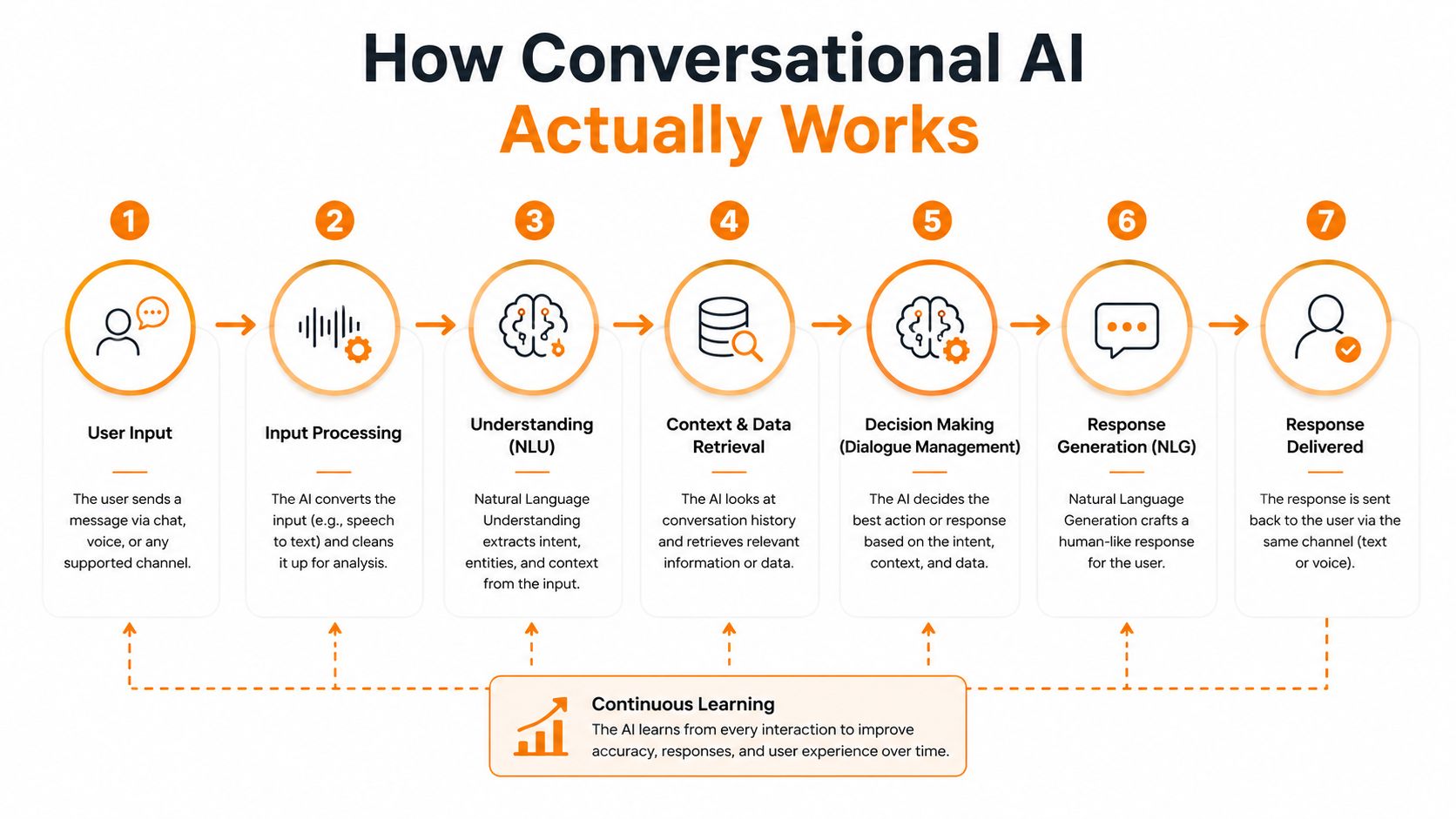
A good way to think about conversational AI is as a relay team, not a single runner. Each stage takes the message a little further, and the handoffs matter just as much as the final reply.
The five stages in plain English
First comes input processing. That's the receptionist at the front desk hearing the request, whether it arrives as text or speech.
Next is Natural Language Understanding, or NLU. The system determines the true intent behind the user's words, not just the literal phrasing. If someone says, “Can you move my meeting?”, the system must decide whether they mean reschedule, cancel, or shift a calendar invite.
Then comes dialogue management, which is the memory and decision layer. It keeps track of what's already been said, what's still missing, and what the next sensible action is. Think of it as the person in the room who remembers the whole thread and stops everyone from starting over.
After that is Natural Language Generation, or NLG. This is the drafting stage, where the system writes the reply in clear language. The idea is simple, it should sound like a useful human response, not a stitched-together script.
Finally, output generation delivers that reply as text or voice. The whole sequence can happen within milliseconds in a well-designed system, and production teams usually look for thresholds such as intent recognition above 85% and response latency under 500 ms before they trust it in live work (Netguru technical guide).
If one stage is weak, the whole experience feels clumsy. The interface can look polished, but the conversation still falls apart.
For a deeper plain-English overview that's easy to skim, discover conversational AI technology from Nolana AI. The key point is that this pipeline shape does not belong to one channel. The same logic can sit behind chat, email, or a voice call.
From Rule-Based Bots to AI Agents
A useful way to judge conversational systems is by how much work they can carry, not just how well they can answer a question. Some stop at recognition, some follow a fixed path, and some can take a request, check systems, and finish the task.
Four common architectures
A rule-based bot works like a vending machine. It responds when the wording matches the preset buttons, and it breaks down quickly when the user phrases the request another way. That makes it fine for narrow FAQs, but brittle for anything messy or ambiguous.
An ML-based assistant is closer to a kiosk with a trained attendant. It can recognise intent from examples and handle more variation, but it still usually depends on structured flows. The model helps with interpretation, while the process still stays quite controlled.
A hybrid stack combines both. The deterministic parts stay locked down for compliance, approvals, or handoffs, while the conversational parts stay flexible enough to handle real language. For regulated environments, that split often makes the system easier to trust because the guardrails remain visible.
An AI agent sits on top of large language models and can plan steps, call APIs, and recover from simple errors. It behaves less like a scripted reply engine and more like an autonomous teammate that can work through a sequence of actions.
For a broader view of how LLMs change interaction design, Ryware on enterprise generative AI is a useful external reference. The important detail is that many real deployments still combine orchestration, rules, and model output rather than relying on a fully free-form agent.
That is why the most practical enterprise systems are still hybrid, even when the marketing calls them “agents”. Businesses usually need both flexibility and control, especially when the assistant is expected to do more than answer questions.
Osher Digital's AI agent development sits in that same practical zone, where the conversation has to connect to real systems, not just produce a polished response.
Where Conversational AI Plugs Into Your Business
A prospect emails a sales rep asking for pricing, implementation timing, and whether the product fits their stack. A conversational AI layer can read the CRM record, draft a personalised reply, book the meeting, and update the opportunity stage before the rep even opens the inbox.
That same pattern works in finance. A vendor invoice arrives by email, the system extracts the line items, matches them to a purchase order, and posts a draft entry into the ERP for a human to approve. The person still signs off, but the repetitive sorting has already been done.
The workflow matters more than the chat box
This is why the enterprise value sits in integration. Conversational AI is not just a front-end widget, it's a workflow layer that can move information across CRM, ERP, helpdesk, HR, and data systems. The conversation is the trigger, but the action is the outcome.
The right question is not “what does it say back?”, it's “what does it update, route, or complete?”
That distinction also changes how IT teams evaluate the stack. If the assistant can preserve context, call external APIs, and keep the thread intact, it can reduce handoffs across departments. If it can't, it becomes another place where work stops and gets copied somewhere else.
For a close look at process automation patterns that often sit beside conversational AI, robotic process automation is a useful reference point. RPA handles the repetitive movement of data, while conversational AI handles the language layer that starts or guides the action.
In practice, the best enterprise use cases are not the ones with the flashiest chat experience. They are the ones where a request arrives in plain language and the system does the boring part correctly, every time.
Enterprise Use Cases That Pay Back
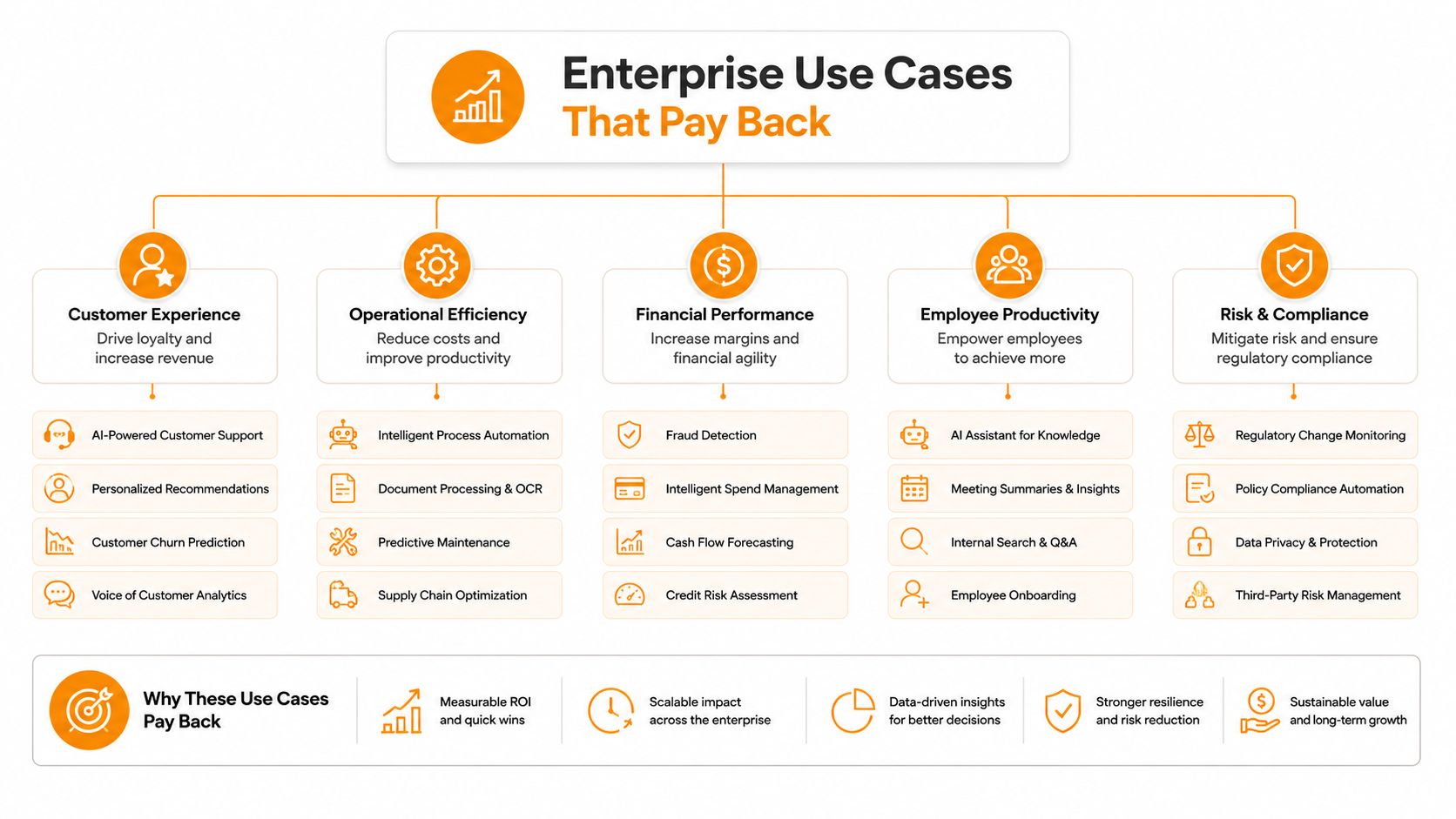
The use cases that pay back usually begin with work people already repeat, such as triage, lookup, routing, or data entry. Conversational AI earns its place when it takes a plain request, checks the right system, and completes the next step without forcing a human to copy the same details again.
Customer service, sales, finance, internal support, and data access
Customer service automation usually starts with a common request that lands after hours or during a peak queue. The system can answer the question, gather missing context, or hand the case to a person when the issue needs judgment. For a closer look at practical service patterns, Real-world AI service implementations shows how these workflows play out in live environments.
Sales automation matters when an inbound lead asks for details, wants to book time, or needs a prompt follow-up. The assistant can qualify the lead, route it to the right rep, and update the record so the CRM does not become a pile of half-finished notes. Teams that want a cleaner handoff between conversation and pipeline work can also use sales automation to keep the next action attached to the original request.
Finance and process automation fits tasks that repeat the same way every time, such as invoice checks, expense review, and reconciliation. A message or form becomes the trigger, the AI extracts and matches the data, and the approval flow continues inside the ERP or a connected system. The value comes from reducing manual sorting, not from making the process feel flashy.
Internal support is a strong fit for HR and IT. Employees ask about passwords, leave, policies, or access, and they usually want an immediate answer rather than a ticket that sits in a queue. The assistant can resolve simple requests, gather context for harder ones, and route the rest to the right team with less back-and-forth.
Data operations often gets overlooked because it feels less visible than customer-facing work. A business user asks a plain-English question about a warehouse, a report, or a dataset, and the assistant helps surface the answer without forcing someone to file a request and wait for a manual query. That makes conversational AI feel less like a chat window and more like a workflow layer that can read context, move work forward, and close the loop.
The common pattern across all five use cases is simple. A request comes in, the system understands enough of the language to identify the intent, it reaches into the right business tool, and the business can verify the result.
ROI, KPIs, and How to Prove the Win
A board does not care that the bot had a busy week. It cares whether the work got cheaper, faster, safer, or more scalable. That means the metrics have to connect directly to the process you are trying to improve.
The four KPI families that matter
For service, the useful measures are deflection rate and first-contact resolution. If repetitive questions no longer reach the queue, and customers get a clean answer the first time, you're moving in the right direction.
For sales, look at lead-to-meeting conversion and pipeline velocity. If conversational AI helps the team respond faster, qualify better, and keep records clean, the pipeline tends to move with less friction.
For finance and operations, the main signals are cycle time and error rate. The target is not just speed, it's fewer manual corrections and fewer late-night clean-ups.
For internal support, watch adoption rate and time-to-answer. If people use the assistant and get what they need quickly, you have a working tool rather than a vanity feature.
A practical rule of thumb is that even 20% deflection of repetitive volume can free up two to three full-time equivalents in a mid-sized service team, but only if the baseline volume is real and the workflow is stable. Measure against the current process, not against enthusiasm.
Pilot numbers can look good and still mislead. Production metrics three months later are the ones that tell the truth.
Avoid vanity measures like chat volume or raw message count. They can rise while the customer experience stays flat, and that is not the kind of growth anyone wants to fund twice.
Should You Buy, Configure, or Build
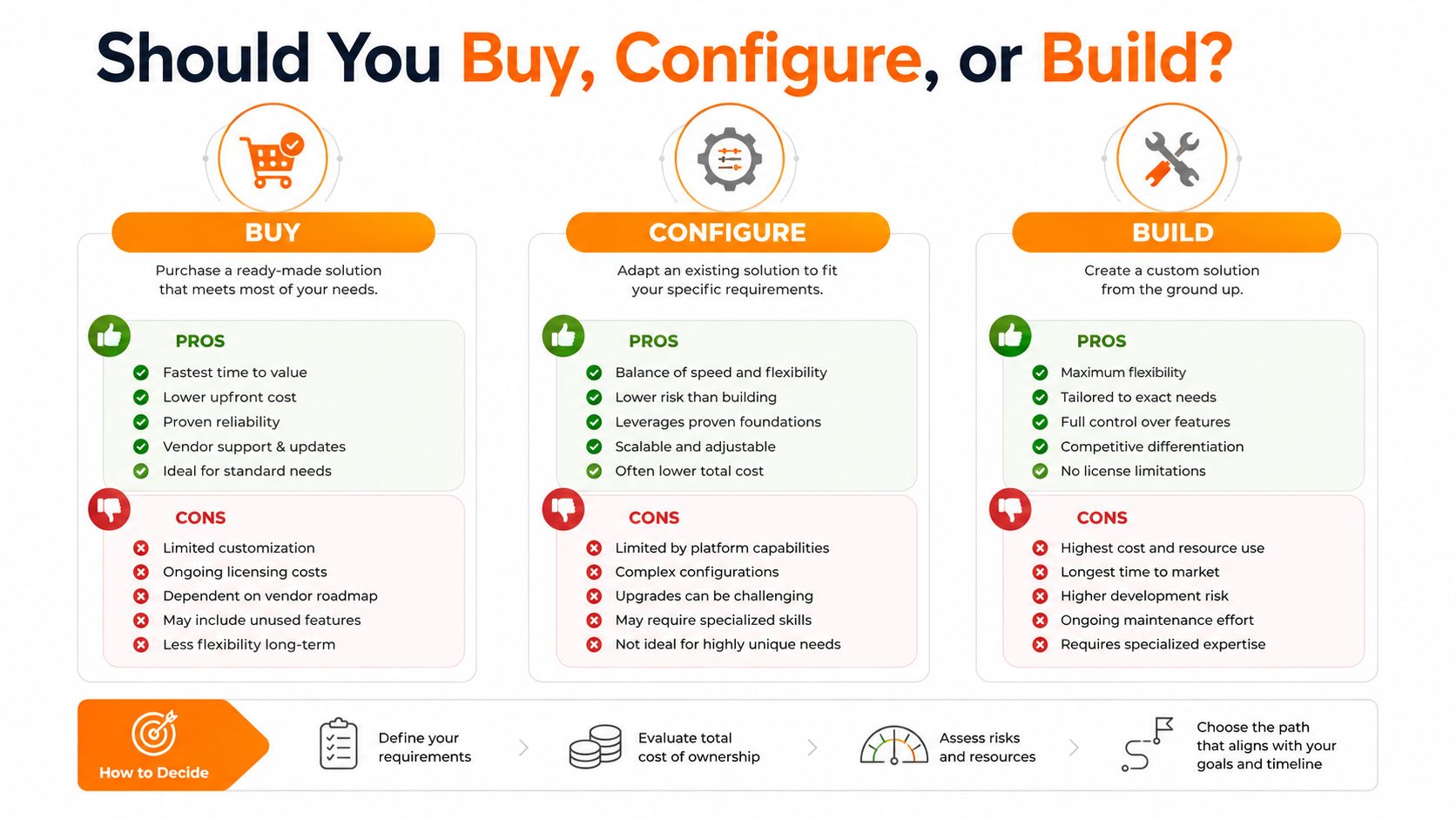
The wrong delivery model costs more than the wrong model choice. A platform can be too rigid for a messy workflow, and a custom build can be far too heavy for something ordinary.
Three paths, five criteria
Buy a platform when the use case is standard and the connectors already exist. It is like renting a serviced office. You move in fast, but you live with the layout someone else chose.
Configure low-code when the logic is familiar but the workflow needs some tailoring. That is closer to fitting out a floor. You still move quickly, but you decide where the walls and desks go.
Build custom when the process is unique, regulated, or tangled across systems in a way no off-the-shelf tool handles cleanly. That is building from the ground up. It takes longer, but you get exactly what the business needs.
| Criterion | Buy platform | Configure low-code | Custom build |
|---|---|---|---|
| Speed to value | Fastest for common use cases | Fast, with some setup | Slowest |
| Fit to existing systems | Good if connectors already exist | Better with light adaptation | Highest when workflows are unique |
| Data governance | Depends on vendor controls | Better visibility than plug-and-play | Strongest if designed well |
| Total cost over three years | Lower upfront, can rise with scale | Balanced for many teams | Higher upfront, but can pay off for unique needs |
| Regulated or messy edge cases | Limited | Moderate | Best suited |
The common mistake is obvious once you say it out loud. Some teams buy a platform for a problem that needs a custom build, while others commission bespoke code for something a platform could have solved in a fortnight. A quick checklist helps:
- Workflow clarity: Is the process stable enough to automate?
- System access: Can the assistant reach the right CRM, ERP, or ticketing tools?
- Governance needs: Do you need approvals, audit trails, or human handoff?
- Change load: Will the team need to learn a new working pattern?
- Time horizon: Are you solving for the next quarter or the next three years?
Adoption Pitfalls and Your Next Steps
The first failure is skipping the data and integration audit. If you do not know where the records live, who owns them, and which system should be updated, the project turns into a polished demo with nowhere to land.
The second is measuring success on chat volume instead of business outcomes. The third is ignoring change management for the people whose jobs shift when repetitive work gets automated. The fourth is underinvesting in security review, especially when the assistant can touch customer or financial data.
A practical adoption path
Pick one repeatable workflow. Baseline the current cost. Define the success metric. Scope the data and system access. Pilot in a narrow lane. Measure for 90 days. Then expand only if the numbers and the team both make sense.
That sequence keeps the project grounded. It also makes it easier to explain the initiative to finance, IT, and operations without overselling what the technology can do on day one.
If you want help scoping a pilot, wiring the right systems together, or choosing between platform and custom build, AI consulting is a sensible starting point. Osher Digital works on business process automation and AI-driven solutions that connect systems and reduce repetitive work, which is exactly where conversational AI earns its keep.
Osher Digital helps enterprises turn conversational AI into working operations, not just a front-end chat experience. If you're planning a pilot, reviewing integrations, or deciding whether to buy or build, visit Osher Digital to see how they approach automation, AI agents, and system integration in real business environments.
Last updated on July 29, 2026
Free tool · 1 minute
AI Agent Idea Generator
Describe a painful process and get concrete AI agent concepts for your industry.
Continue Reading
View all
Master Your AI Readiness Assessment for 2026
Is your business ready for AI? Our AI readiness assessment helps you measure data, tech, & process maturity to build a realistic roadmap for 2026.
Jul 29, 2026

AI Driven Decision Making for Australian Enterprises
Unlock growth with AI driven decision making. Our guide for Australian enterprises covers strategy, governance, & implementation for smarter, faster decisions.
Jul 17, 2026

What Is Semantic? A Comprehensive Guide for 2026
What is semantic and why does it matter for your business? Understand semantic tech, from AI to search, for enterprise automation.
Jul 17, 2026
Sick of reading about automation?
Book a free 15-minute intro call. We’ll talk through what you’re trying to automate and whether we’re a good fit.