Your 2026 Guide to AI Receptionist Australia
The usual trigger for looking at an AI receptionist isn’t curiosity. It’s frustration. Calls are going unanswered. Reception staff are stretched. After-hours enquiries sit in voicemail until morning, and by then the caller may have moved on. In a medium or large organisation, that problem rarely stays at the front desk. It spills into sales, […]
By Matthew Clarkson · May 25, 2026

The usual trigger for looking at an AI receptionist isn’t curiosity. It’s frustration.
Calls are going unanswered. Reception staff are stretched. After-hours enquiries sit in voicemail until morning, and by then the caller may have moved on. In a medium or large organisation, that problem rarely stays at the front desk. It spills into sales, service, rostering, compliance, and reporting.
That’s why interest in AI receptionist Australia solutions has accelerated. The technology now sits in a practical middle ground. It’s no longer a novelty, but it’s also not magic. Used well, it acts like a dependable first-line operator that handles repeatable conversations, updates systems, and hands off the odd cases to your team. Used badly, it becomes a polite bottleneck that creates more work than it saves.
What Is an AI Receptionist and Why It Matters Now
An AI receptionist is best understood as a digital front desk. It answers inbound calls, works through common requests, captures caller details, and either completes the task or routes the person to the right place.
That sounds simple, but the business impact is often larger than the label suggests. Most organisations don’t need a machine that can talk about anything. They need one that can reliably handle the same core jobs, over and over, without letting leads or service requests fall through the cracks.
What it looks like in practice
A well-trained assistant who never leaves the desk unattended. It can:
- Answer straight away when staff are busy or off the clock
- Book or request appointments using connected calendars
- Capture lead details instead of sending callers to voicemail
- Route calls sensibly based on the reason for contact
- Send summaries back to staff so follow-up is faster
If you want a simple example of how businesses are using AI to improve call handling for businesses, that use case is now firmly in the mainstream rather than the experimental category.
Australian buyers should care because the local market has matured. Australian-focused vendors now market AI receptionists as tools that answer calls instantly and book jobs 24/7 , and some local commercial offerings are priced at A$48 per month including GST with a 14-day free trial according to Sophiie’s Australian AI receptionist offering.
Why this matters now
That level of standardised local packaging changes the conversation. A few years ago, many businesses assumed this sort of capability required a custom project, a large IT budget, or a tolerance for rough edges. Now there are local options with Australian support, straightforward onboarding, and workflows designed for real operating conditions.
Practical rule: If your business loses value when a phone rings and nobody answers, AI reception is no longer a fringe idea. It’s an operations decision.
For organisations trying to sort out whether they need a vendor tool, a workflow redesign, or broader automation support, this is often where specialist AI consulting helps. The important point is to frame the problem correctly. You’re not buying a talking robot. You’re deciding how your business should handle incoming demand when humans can’t respond instantly.
Beyond Answering Calls The Real Business Value
The obvious benefit is call coverage. Its core value sits deeper in the workflow.
An AI receptionist becomes useful when it doesn’t just answer the phone, but captures intent, moves work forward, and protects staff time. That’s why the better deployments are not sold internally as “phone automation”. They’re treated as intake and triage infrastructure.

Where the value actually appears
If you run a growing organisation, there are three places to look.
First, lead capture. Many businesses still rely on staff availability to determine whether an enquiry becomes an opportunity. That’s a weak operating model. A capable AI receptionist can collect contact details, reason for enquiry, urgency, preferred timing, and any simple qualification points before your team even sees the request.
Second, service consistency. Human reception teams vary by shift, workload, confidence, and context. A digital workflow doesn’t get flustered at lunchtime, after hours, or during a spike in inbound demand. It gives your business a steadier front door.
Third, role protection for skilled staff. Highly paid people should not spend their day repeating trading hours, rescheduling routine bookings, or manually typing caller notes into another system. Those jobs matter, but they don’t always require a person.
A better way to think about labour
The right mental model is not “replace reception”. It’s “stop using expensive humans as glue between systems”.
That matters because businesses often underestimate how much manual coordination sits behind a simple inbound call. Someone answers. Someone listens. Someone looks up a calendar. Someone updates the CRM. Someone sends an email. Someone remembers to follow up. If you can automate the repeatable parts of that chain, you reduce friction well beyond the first conversation.
A lot of that value only appears when call data flows cleanly into downstream tools. That’s why broader automated data processing often ends up being part of the same operational conversation.
The strongest business case usually comes from repeatable, high-volume interactions. Not from trying to automate every possible conversation.
What does not work
The weak pattern is handing an AI receptionist a vague brief like “sound natural and help customers”. That produces pleasant conversations without reliable outcomes.
The stronger pattern is to define jobs clearly:
- New enquiry intake with required fields
- Appointment booking against live availability
- Status checks for common customer questions
- Escalation rules for urgent or sensitive matters
When leaders focus on those outcomes, they stop judging the tool like a demo and start judging it like an operational asset.
How AI Receptionists Work with Your Existing Systems
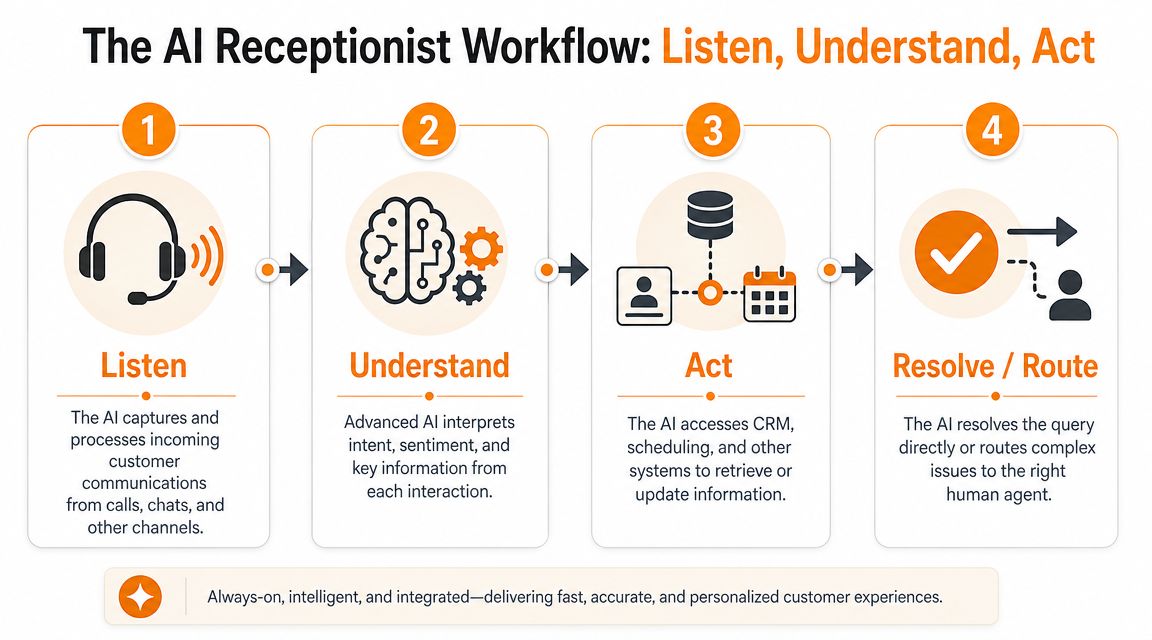
Most executives don’t need the deep technical stack. They do need a clear mental model. The simplest one is listen, understand, act.
The AI receives a call, works out what the caller wants, then does something useful with that information. If it can’t complete the task safely, it hands over.
Listen and understand
The first layer is telephony and speech processing. The system answers the call, turns speech into usable text or intent signals, and identifies the likely reason for contact.
That part matters less than many vendors imply. The challenge isn’t whether the AI can hear words. It’s whether it can map those words to a controlled business action.
Australian deployments have become more practical because the strongest local implementations focus on high-frequency, low-entropy dialogues such as appointment scheduling and call routing. Vendors also emphasise Australian-accent handling and deep CRM integration to reduce handoff friction, as described by AI Automata’s Australian AI receptionist documentation.
Act inside the systems you already use
An AI receptionist either becomes valuable or becomes annoying.
A useful deployment needs to connect into the systems your staff already trust. Common examples include:
- CRM platforms such as Salesforce or HubSpot for lead and contact logging
- Calendars such as Microsoft 365 or Google Calendar for real-time booking
- Helpdesk tools for support ticket creation and routing
- Job management systems for field services, maintenance, or trade workflows
- Email and SMS tools for confirmations and follow-up messages
If those links are missing, the AI may still answer calls, but staff end up re-entering data manually. That’s where many projects gradually lose credibility.
One practical path for connecting these handoffs is through broader system integrations work, especially when the business runs a mix of older platforms and newer cloud tools.
Why constrained workflows win
There’s a reason the better systems feel less flashy in demos. They are usually more disciplined.
Instead of inviting the model to improvise, teams define specific intents, specific actions, and specific exception paths. In plain English, the AI knows the lanes it’s allowed to drive in. That’s how you reduce booking errors, duplicate records, and bad transfers.
A solid design often includes:
- Intent categories such as booking, cancellation, new enquiry, billing, or urgent support
- Validation rules so the AI checks live availability or required details before confirming anything
- Fallback paths that route edge cases to a human rather than guessing
- Structured outputs so summaries and records land in the right fields
A receptionist workflow should behave more like a train line than an open paddock. Fixed routes beat free-form wandering.
This is why executives should ask less about “how human it sounds” and more about whether it completes the right actions in the right systems.
Navigating Australian Compliance and Data Privacy
For many Australian organisations, compliance is the part that turns a promising pilot into a board-level discussion.
An AI receptionist can touch call audio, transcripts, caller identity, appointment details, case notes, and internal system records. In healthcare, legal, financial services, and other sensitive environments, that isn’t just operational data. It may be personal information with clear governance obligations.
What APP 8 means in plain English
One issue comes up quickly. Where does the data go?
When an Australian organisation uses an AI receptionist that discloses personal information overseas, Australian Privacy Principle 8 applies. The organisation remains accountable and must take reasonable steps to ensure the overseas recipient does not breach the APPs. That’s why data residency and vendor due diligence matter for call audio, transcripts, and caller metadata, as explained in Callin’s overview of AI receptionist compliance in Australia.
In practical terms, this means you can’t shrug and say the vendor handles privacy. If the vendor sends data offshore for speech processing, storage, model inference, support, or analytics, your organisation still carries responsibility.
The vendor questions that matter
Most marketing pages focus on convenience. Risk teams need a different list.
| Category | Key Question |
|---|---|
| Data residency | Where are call recordings, transcripts, and metadata stored and processed? |
| Overseas disclosure | Which subprocessors handle data outside Australia, if any? |
| Access control | Who can access transcripts, audio, and logs within the vendor environment? |
| Retention | How long is data kept, and can retention rules be configured? |
| Consent handling | How does the system support call recording notices and consent workflows? |
| Auditability | What logs exist for access, edits, routing, and human handoff? |
What good governance looks like
A mature deployment usually includes several design choices from the start:
- Least-privilege access so only the right teams can view sensitive transcripts
- Encryption controls for data in transit and at rest
- Retention policies matched to legal and operational needs
- Handoff logging so you can see when AI stopped and a staff member took over
- Integration review because every linked CRM, booking tool, or ticketing system expands the compliance surface
Compliance view: Treat the AI receptionist as a governed workflow, not as a voice feature.
That distinction matters. If leaders see the tool as “just another phone system”, they often under-scope risk review. If they see it as a customer intake layer connected to core systems, the right controls usually follow.
Calculating the True Return on Investment
The easiest ROI mistake is to compare subscription cost with one receptionist salary and stop there.
That creates a distorted decision. An AI receptionist usually changes more than payroll. It changes responsiveness, lead capture, service continuity, staff allocation, and the amount of manual admin required after each call.
Start with avoided loss, not just labour reduction
In Australia, the business case is stronger when you frame it against a tight labour market and high turnover in service roles. Buyers should compare the technology not just against wages, but also against recruitment, training, and revenue leakage from missed after-hours calls and leads, as discussed in this Australian business case overview on YouTube.
For most organisations, the useful ROI lens includes four buckets.
- Missed opportunity recovery. Count the enquiries that currently land in voicemail, ring out, or wait until the next business day.
- Administrative time reduction. Estimate the staff effort spent on message-taking, booking back-and-forth, and CRM updates.
- Service continuity. Consider the cost of vacancies, leave coverage, and turnover in front-line roles.
- Workforce redeployment. Measure what higher-value staff can do once routine intake is removed from their day.
Use a simple internal scorecard
You don't need a complex finance model to test viability. A practical scorecard works well:
What matters is trend direction and operational fit. If your business has low inbound volume and highly nuanced conversations, the return may be modest. If it has repetitive demand across long operating hours, the picture usually changes fast.
Common ROI traps
A few assumptions regularly derail evaluation.
First, businesses overestimate full automation. Some calls still need empathy, judgment, or exception handling. Second, they ignore downstream work. If the AI captures more enquiries but your team still responds slowly, the gain shrinks. Third, they underweight staff adoption. If teams don’t trust the notes, bookings, or routing logic, they’ll create parallel manual processes.
The best ROI cases come from organisations that audit the full call journey, not just the answer rate.
Vendor Solution vs Custom Build Which Path Is Right?
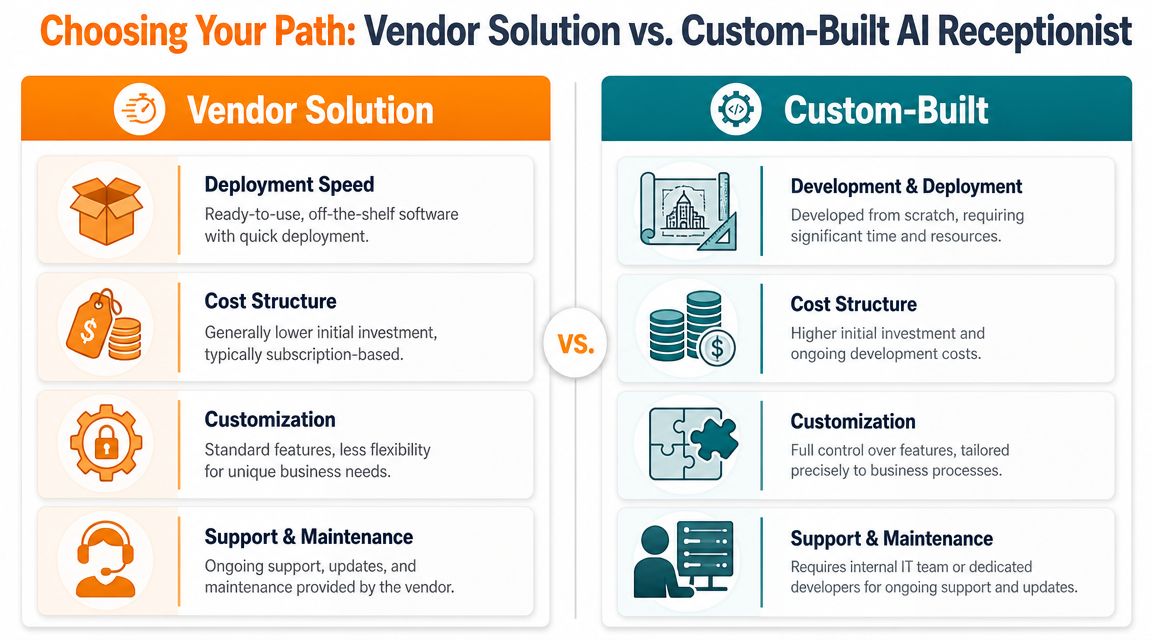
This decision is more practical now because the market has broadened. In Australia, the AI answering service category is commercialised for small businesses at around A$48 per month , including a dedicated Sydney number and post-call summaries, according to AI Answering Service’s local offering. That means even larger organisations can start by comparing packaged options against custom development rather than assuming custom is the only serious path.
When a vendor solution makes sense
A pre-built platform is usually the right starting point when your needs are common and your timeline is short.
That often applies when you need:
- Fast deployment for missed-call coverage or after-hours intake
- Standard features such as message capture, appointment booking, and summaries
- Vendor-managed maintenance rather than internal engineering ownership
- A lower-risk pilot before wider workflow redesign
The trade-off is flexibility. Vendor tools can be strong at common patterns and weak at unusual operating logic, complex approval steps, or strict internal data handling requirements.
When custom is the better fit
A custom build becomes more sensible when the AI receptionist is only one piece of a larger operating model. This is common in enterprises with legacy systems, unusual routing logic, regulated workflows, or multiple business units that need different rules.
Custom doesn’t just mean “build everything from scratch”. It can also mean orchestrating telephony, AI services, CRM actions, security controls, and reporting around your own workflow design. That’s where firms such as Osher Digital may be used as one implementation option for AI and automation projects that involve business process automation, system integration, and custom agent logic.
The more your frontline process is a reflection of internal systems and policy, the less likely an off-the-shelf tool will fit neatly.
Side-by-side trade-offs
| ROI area | What to measure internally |
|---|---|
| Lead capture | After-hours enquiries, unanswered calls, follow-up lag |
| Booking flow | Time to confirm, reschedule load, duplicate bookings |
| Staff impact | Time spent on repetitive intake and call triage |
| Risk reduction | Reliance on single staff members or thin shift coverage |
| Decision factor | Vendor solution | Custom build |
|---|---|---|
| Speed | Faster to trial and launch | Slower because workflow design and integration take time |
| Flexibility | Good for common use cases | Better for unique operating rules |
| Ownership | Vendor handles updates and support | Your team or partner owns ongoing change |
| Compliance control | Limited by vendor architecture | Greater control if designed properly |
Neither path is automatically better. The right choice depends on how unusual your intake process is, how much compliance control you need, and whether AI reception is a tactical fix or part of a broader transformation.
Your AI Receptionist Implementation Checklist
At 8:15 on a Monday, the phones spike, the front desk is already tied up, and three callers abandon before anyone picks up. That is usually the moment executives decide they need an AI receptionist. It is too late to start planning then.
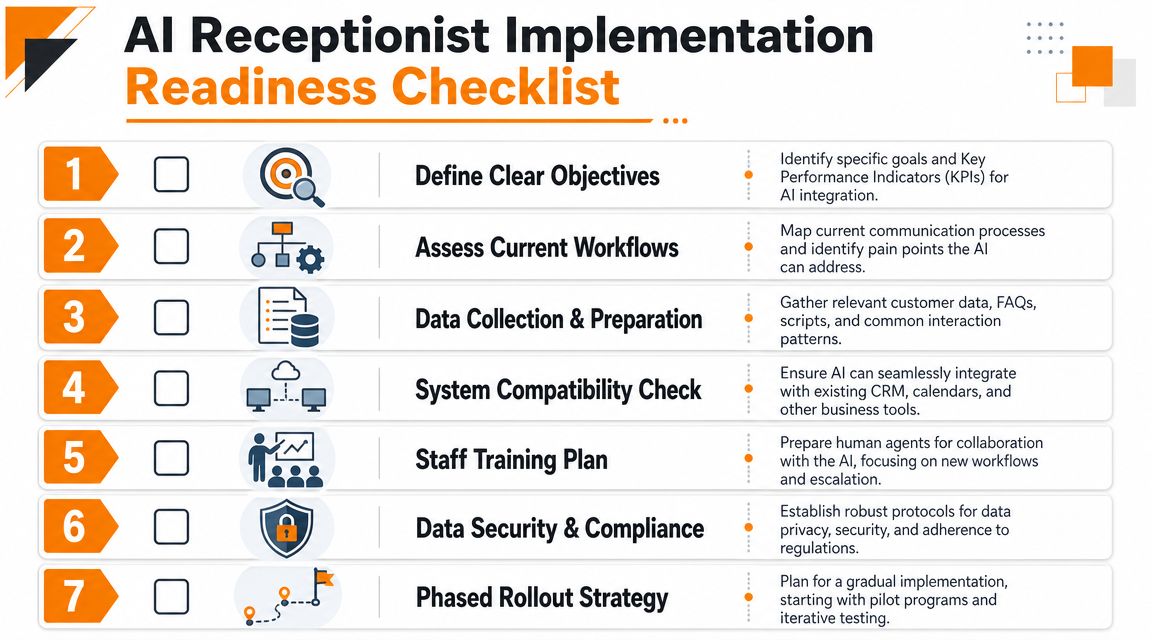
The projects that hold up in production are usually the ones that treat implementation as an operations exercise first. Before procurement starts, document how calls arrive, where they should go, what systems are touched, and where a human must stay in the loop. In practice, that work exposes two things quickly: which call types are easy to automate, and which ones create compliance or customer experience risk if you get them wrong.
Readiness checks before you buy
- Define the job clearly. Decide whether the system will handle overflow calls, appointment booking, lead qualification, support triage, or a narrower task to start.
- Audit call reasons. Review inbound call categories and mark which requests are repetitive, rules-based, and low risk enough to automate.
- Map system dependencies. List every platform involved, including telephony, CRM, calendars, ticketing, identity access, and reporting.
- Set success measures. Use operational metrics such as answered-call rate, booking completion, routing accuracy, first-contact resolution, and staff time returned to higher-value work.
- Review privacy posture. Check how recordings, transcripts, caller identity data, and consent are handled. For Australian organisations, this should happen before contracts are signed, not after the pilot starts.
- Design escalation rules. Specify which callers must go straight to a person, what triggers that handoff, and what context the staff member receives.
- Pilot in phases. Start with a narrow slice of demand, monitor failures closely, then expand once accuracy, handoff quality, and reporting are stable.
This walkthrough can help your team visualise the rollout process:
https://www.youtube.com/embed/x7G6VRxmK6Y
Vendor Selection Questions
| Category | Key Question |
|---|---|
| Workflow fit | Which call types can the system fully resolve without human intervention? |
| Integration | How does it connect with our CRM, calendars, telephony, and helpdesk tools? |
| Handover | What triggers escalation, and what context is passed to staff? |
| Security | How are transcripts, recordings, and caller details protected? |
| Governance | What controls exist for retention, audit trails, and access management? |
| Operating model | Who tunes prompts, workflows, and routing rules after go-live? |
A good demo is not enough. Ask the vendor to show the full path of a call from intake to handoff to audit log. If they cannot explain where data is stored, how exceptions are handled, and who owns ongoing tuning, the implementation risk is still high.
For Australian enterprises, the checklist should also answer a harder question. Will this system stand up to procurement, security review, and legal scrutiny once real customer data starts flowing through it? If the answer is unclear, pause the rollout and fix that before scale.
If you’re weighing vendor options, privacy constraints, and integration complexity, a practical next step is to speak with Osher Digital. Their team works on automation and AI workflows for organisations that need a clear implementation path rather than another generic software pitch.
Last updated on July 1, 2026
Free tool · 1 minute
AI Agent Idea Generator
Describe a painful process and get concrete AI agent concepts for your industry.
Continue Reading
View all
Master Your AI Readiness Assessment for 2026
Is your business ready for AI? Our AI readiness assessment helps you measure data, tech, & process maturity to build a realistic roadmap for 2026.
Jul 29, 2026

What Is Conversational AI and How Enterprises Use It
Learn what is conversational AI, how it works under the hood, and where Australian enterprises are actually using it to cut costs and scale service.
Jul 29, 2026

AI Driven Decision Making for Australian Enterprises
Unlock growth with AI driven decision making. Our guide for Australian enterprises covers strategy, governance, & implementation for smarter, faster decisions.
Jul 17, 2026
Sick of reading about automation?
Book a free 15-minute intro call. We’ll talk through what you’re trying to automate and whether we’re a good fit.