Legal
Affinity to Notion Sync for a Law Firm
A Melbourne law firm ran its matters in Notion and its records in Affinity, with staff re-keying between the two. Osher Digital built a guarded daily sync that keeps Notion current and never overwrites the work a person did by hand.
Overview
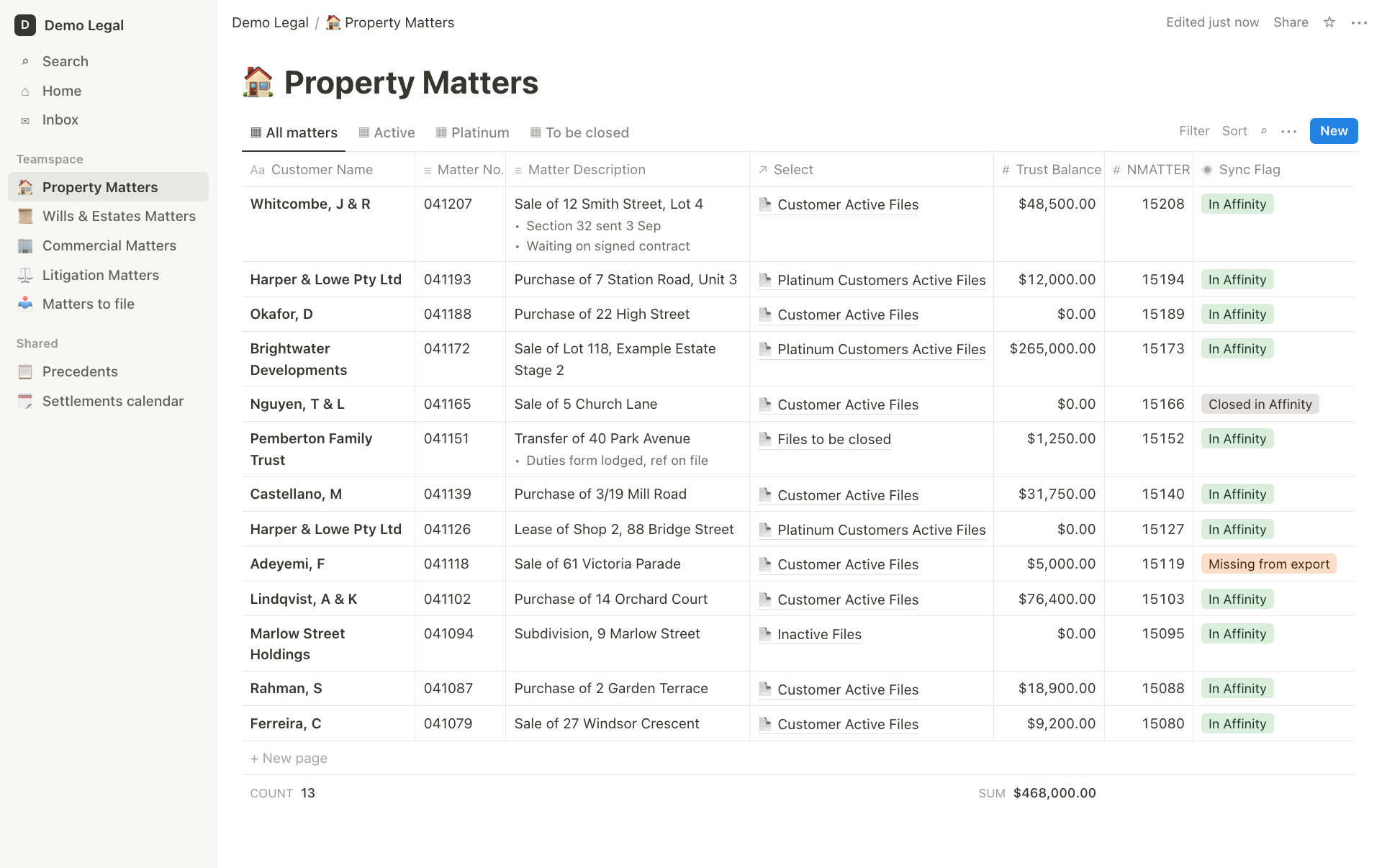
Sharrock Pitman Legal runs its day-to-day matter tracking in Notion and keeps its system of record in Affinity, its practice management system. The two never talked to each other. Admin staff re-keyed matter details and trust balances from one into the other, and the Notion lists drifted a little further from Affinity every week.
Osher Digital built a middleware service that reads a scheduled export from Affinity, compares it with the firm's Notion lists, and writes only the differences. It updates the fields Affinity owns, leaves alone everything a person set by hand, and refuses to run when the numbers look wrong. The firm gets a weekly audit email listing what changed and which records need a person to look at them.
About the Client
The client is an established Melbourne law firm, practising across property, wills and estates, commercial law and litigation. Lawyers and admin staff work from four Notion master lists, one per practice area, holding a little over a thousand open matters between them. Affinity holds the full history: more than 22,000 matters going back years.
Problem
Notion was where the work happened, and Affinity was where the truth lived. Keeping them in step was a manual job.
Every new matter opened in Affinity had to be added to the right Notion list by hand
Trust balances in Notion were only as current as the last time someone typed them in
Matters that closed in Affinity stayed on the Notion lists until someone noticed
Descriptions were typed separately in each system, so the same property could be "12 Smith St" in one and "12 Smith Street, Lot 4" in the other
Nothing in Notion reliably identified which Affinity matter a row belonged to
The obvious fix, a nightly job that overwrites Notion with whatever Affinity says, would have done real damage. The firm's staff keep working notes underneath each matter description. They move matters into hand-managed categories such as "Files to be closed" on a lawyer's instruction, and they mark platinum customers using information the export does not carry. A sync that flattened any of that would undo the firm's own workflow, and nobody would find out until a lawyer went looking for a note that was no longer there.
Solution
Osher Digital built the sync as a single small service that runs on a schedule, after the firm's IT provider drops the Affinity export into a SharePoint library. Access to SharePoint is scoped to that one site and nothing else in the tenant.
A diff, not an overwrite
Each run reads the export and all four Notion lists, then produces a plan: which matters to create, which to update, which have closed, and which have gone missing from the export. The plan can be printed and read by a person before anything is written. A write request only ever names the fields the plan changed, so a column the sync does not own is never touched.
Only open matters are in scope. Of the 22,000 matters in the export, the firm is working on about 1,100, and those are the only ones the sync will create or maintain. When a matter closes in Affinity its Notion row is marked "Closed in Affinity" and then left exactly as it stands.
Affinity wins, but only on what Affinity owns
The sync writes the matter number, description, trust balance, trust date and the two matter categories that can be worked out from the export. The three categories that staff set by hand are treated as sticky. Where Affinity and Notion disagree about one of those, the row is held and reported, never changed.
Descriptions get the same care. The sync replaces the first line with Affinity's wording and keeps everything underneath it, formatting included, so a lawyer's notes survive every update.
Matching checked against independent evidence
The firm's Notion rows had no shared key with Affinity, only a file number that people had typed. A back-fill step pairs each row to its Affinity matter on that number, then checks the pairing against evidence the match never used: the two descriptions. "St" against "Street" is ignored. A different lot number or street number is not.
When the check first ran against the live lists, 669 of 687 rows passed. Eighteen were held for a person to review, and four of those turned out to describe different properties under the same file number. A sync without the check would have stamped all four with another matter's data, and nothing downstream would ever have flagged it.
Guards that refuse to run
Before any write, the plan passes through a set of guards. They refuse a run that would create or flag more matters than is plausible for one day, one that would write a large number of trust balances down to zero, and one where two rows claim the same key. A matter that cannot be placed on a list goes to a holding list for a person to file. It is never guessed into the wrong practice area, where a conveyancing file would sit under Litigation looking as legitimate as every row around it.
Disappearance never deletes. A matter missing from the export is flagged for review, and unflagged by itself if it comes back.
An audit trail the firm can read
Every run is logged with its verdict, its counts and whether it wrote or only reported. A protected audit page shows the history in plain language and separates a run that declined to write from one that crashed. Matter names and balances are kept off any web surface; they appear only in the weekly summary emailed to the firm, which lists what changed that week and names each record that needs attention.
Key technologies used
Node.js, with no third-party dependencies
Notion API
Microsoft Graph API and SharePoint, with site-scoped access
Docker
Resend for the weekly audit email
Results
New matters appear on the correct Notion list without anyone typing them in
Trust balances and descriptions in Notion match Affinity after every run
Closed matters are marked as closed, so the lists show what the firm is working on
Hand-set categories and working notes have never been overwritten
Four mismatched matters were caught before any data was written to them
The firm receives a weekly audit email naming every record that needs a person
The service is covered by 341 automated tests and an end-to-end proof that runs against a sandbox copy of the firm's lists
Two key decisions
Every writer is off by default. Each step that can change the firm's data only reports until it is deliberately switched on, and each has its own switch. The firm saw weeks of "here is what the sync would do" before it did anything, which is how the four mismatched rows were found by reading a report and not by cleaning up afterwards.
A held row is cheaper than a wrong row. Wherever the service cannot be sure, it holds the record and says so. A held row costs somebody a glance. A wrongly matched row costs a matter its data, silently, and in a law firm that is not a trade worth making.
What it is built on
Node.js with zero dependencies, the Notion API, Microsoft Graph and SharePoint, Docker, and Resend for email. The whole image is the Node base plus a few kilobytes of source.