Robotic Process Automation in Accounting Explained
Learn how robotic process automation in accounting streamlines AP, reconciliations and close with ROI, roadmap and controls for Australian enterprises.
By Matthew Clarkson · May 24, 2024 · Updated October 28, 2026
At 4:45 pm on the last day of the month, the accounts payable manager is still chasing approvals. An accountant is comparing bank transactions with a spreadsheet, another is rekeying invoice details into the ERP, and the controller is waiting for a clean set of numbers before reviewing the close. Nobody is doing difficult accounting. They're moving information between screens, checking the same rules repeatedly, and looking for the few items that need judgement.
That's the space where robotic process automation in accounting can help. A software bot can handle repeatable steps, while finance professionals keep responsibility for exceptions, approvals and decisions. The opportunity isn't to replace the finance team with a machine. It's to give the team a dependable assistant for work that follows a clear path.
Introduction Why Accounting Teams Are Turning to Automation Now
Australian finance teams have already moved past the stage of treating automation as a novelty. A 2025 Robert Half survey reported that 99% of Australian finance departments use automation in some capacity, while 38% had extensively or fully integrated it into operations. The same findings showed automation in financial reporting at 59% of departments and in accounts payable and invoice processing at 57%, with expense management and accounts receivable identified as planned next steps. These figures are reported in KPMG Australia's coverage of finance automation adoption.
That combination tells a practical story. Finance teams aren't only testing bots in a safe corner of the business. They're applying automation to high-volume work that affects payment timing, reporting, reconciliations and the month-end timetable.
Practical rule: Automate the predictable work first, then design the controls around everything the bot can't safely decide.
The pressure is familiar in medium and large enterprises. Legacy systems don't always share data cleanly, invoice formats vary, approval chains become difficult to track, and a process that works for one business unit may require manual adjustment in another. Adding more people can help for a while, but it doesn't remove the underlying repetition.
A useful way to understand the wider idea is to look beyond finance. The principles behind robotic automation for manufacturing are similar: software follows a defined sequence, interacts with existing systems and performs consistent actions. In accounting, that sequence might involve reading an invoice, checking required fields, matching it to a purchase order and routing it for approval.
This article follows the problem in the same order a finance operations lead would normally assess it. First, you'll build a clear mental model of RPA. Then you'll see where it fits across accounting workflows, how Australian adoption is developing, and why governance matters as much as speed. The final sections turn that understanding into an implementation and measurement plan.
Understanding How Robotic Process Automation Works in Accounting
Think of an RPA bot as a diligent digital assistant sitting beside an accountant. You give it a written procedure, access to the relevant systems and clear instructions about what to do when something doesn't match. It can open an inbox, read structured information, copy values, click through an ERP and record each action, but it won't understand an unusual transaction in the way an experienced accountant does.
That distinction is important. RPA follows rules. It doesn't independently decide whether a supplier's unusual charge is commercially reasonable or whether a reconciliation difference reflects fraud, timing or a posting error. Those decisions need a person, or a separate AI-assisted process designed and governed for that kind of judgement.
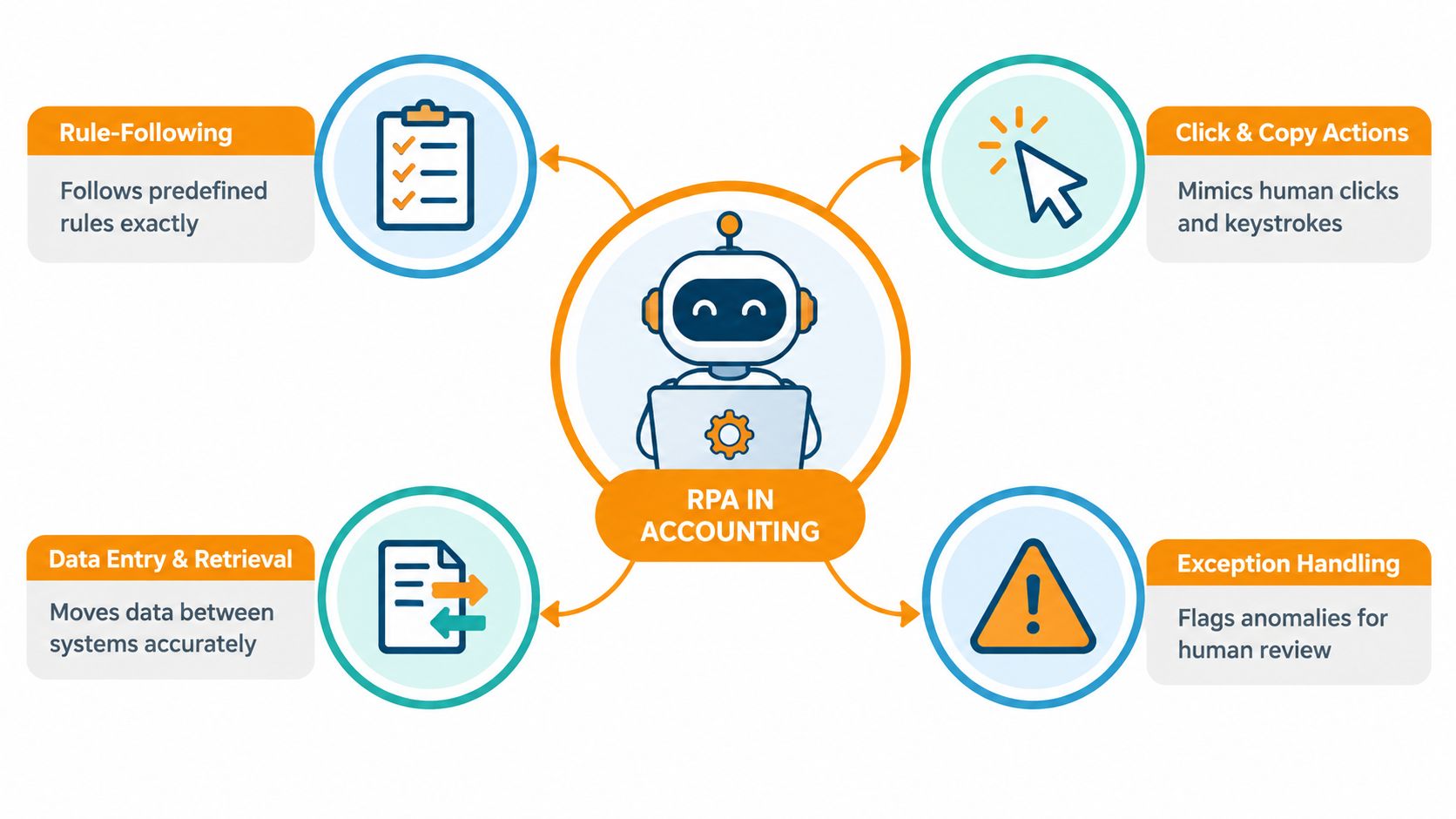
A simple four-step mental model
A trigger starts the work. This could be a new invoice in a monitored mailbox, a scheduled reconciliation or a file arriving from another system.
The bot applies instructions. It checks values against predefined rules, such as required fields, supplier details, tax treatment or a purchase order reference.
The bot moves information. It can retrieve data from one application and enter it into another, including systems that don't have a convenient direct integration.
The bot stops at an exception. If a value falls outside the approved rules, it records the issue and sends it to a person for review rather than guessing.
An orchestrator acts like the office coordinator. It schedules bots, manages queues, records outcomes and makes it easier to see whether a process completed. Human reviewers remain part of the workflow through approval gates, exception queues and release controls.
RPA, built-in automation and AI agents
Built-in ERP automation usually works inside one platform. RPA is useful when a process crosses email, spreadsheets, portals and older applications. It can behave like a user across those screens, although an API integration may be more stable where one is available.
AI agents are different again. They can interpret less structured information and help plan or coordinate a response, but that flexibility introduces a larger control question. A sensible accounting design often keeps deterministic RPA for repeatable data movement and uses AI assistance only where a human reviews the recommendation or exception.
Accounting suits RPA because many tasks are structured, frequent and rule-bound. The bot isn't replacing professional judgement. It's removing the keystrokes that prevent professionals from applying that judgement where it matters.
Where RPA Delivers Value Across Core Accounting Workflows
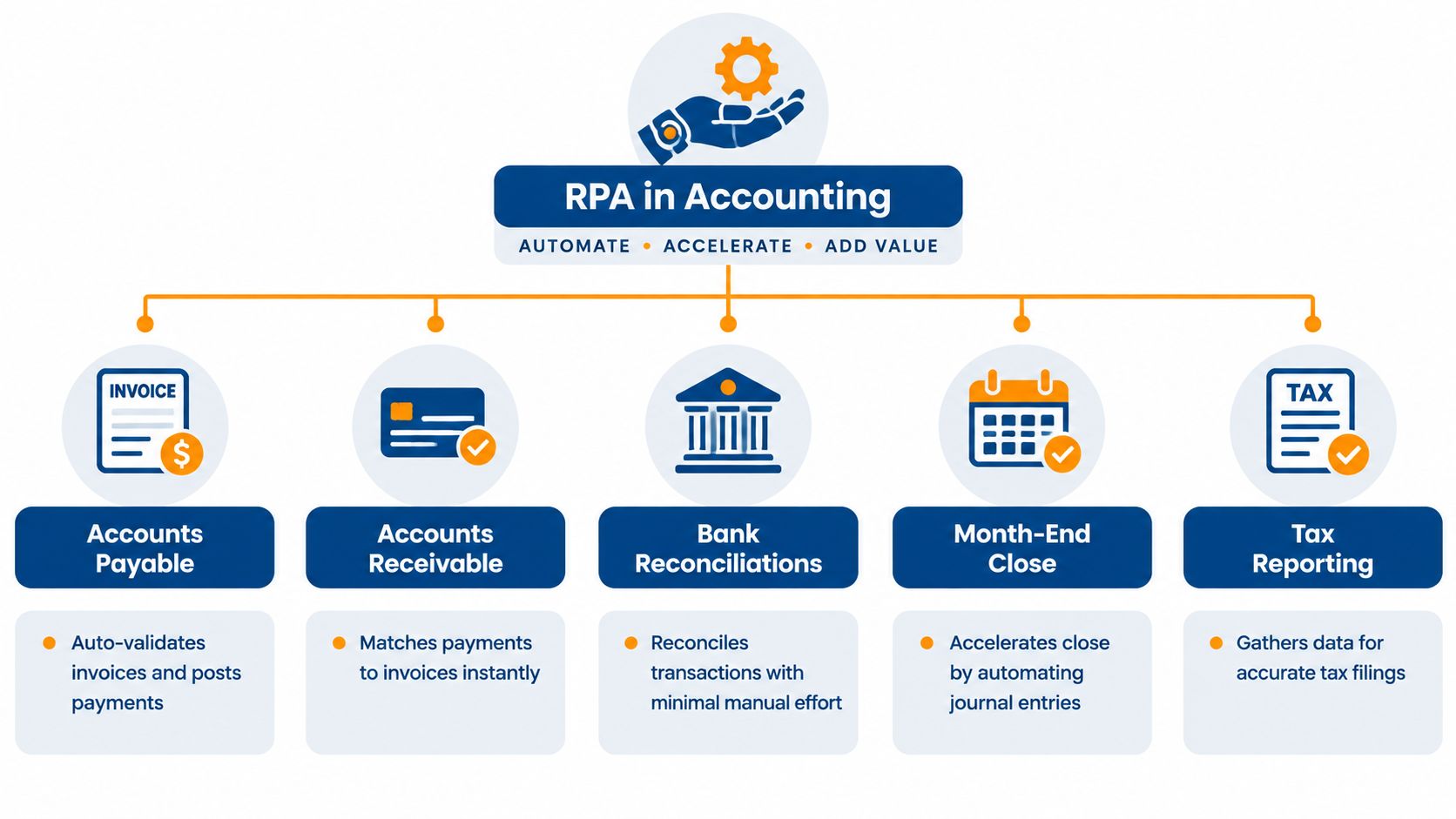
The strongest candidates usually have three features: a clear trigger, a repeatable set of actions and a defined point where a human takes over. That pattern appears across several core accounting processes.
Accounts payable
An invoice arrives by email or through an eInvoicing channel. The bot captures the supplier, invoice reference, dates, amounts, line items and coding fields, then checks the information against a purchase order or approval rule. Straightforward invoices can move through the workflow, while missing purchase orders, unusual amounts or duplicate references are placed in an exception queue.
Australia's Peppol model adds an important design consideration. The Australian Taxation Office explains how Peppol eInvoicing works, including its role as the Australian Peppol Authority and its statement that it doesn't receive or view invoice contents while they move between businesses. A bot can therefore sit around the business's accounting workflow, validating and routing information received through the chosen service provider.
Accounts receivable
For receivables, the trigger may be a bank receipt or remittance advice. The bot retrieves the payment, looks for matching invoice references and applies the organisation's matching rules. A person reviews unmatched receipts, partial payments and customer accounts with unusual balances.
This doesn't make the process judgement-free. It makes the routine matches quick and visible, leaving staff to investigate the items that need context.
Bank reconciliations
A reconciliation bot can collect transactions from the bank and ledger, normalise the fields and compare them. It can tick off exact matches, identify timing differences and create a worklist for unresolved items. The accountant still investigates suspicious or unexplained differences.
Month-end close and tax reporting
During close, RPA can gather supporting data, prepare recurring journal entries under approved rules and update task records. For tax reporting, it can collect transaction data and organise the inputs needed for review. It shouldn't be allowed to make an uncontrolled change to tax treatment or post a material journal without the required sign-off.
For teams handling information from many sources, a specialist Web Scraping API for RAG may be relevant to broader data retrieval projects, but it shouldn't be treated as a substitute for accounting controls. The source, transformation and review path still need to be documented.
Benefits ROI and What Australian Adoption Data Tells Us
The business case for RPA in accounting shouldn't stop at “the bot works faster”. Finance leaders need to connect the automation to outcomes the organisation can observe: less rekeying, fewer avoidable errors, clearer ownership, faster access to information and more capacity for review.
An Australian invoice-processing case study reported that intelligent OCR and workflow orchestration reduced manual keystrokes by up to 90% and made approval workflows touchless. The significance isn't just the headline figure. Removing repeated entry of invoice headers, line items and coding details also removes a common bottleneck before an invoice reaches the right approver. The result is described in the Australian invoice-processing case study.
A practical ROI frame
Use four questions when preparing a business case:
- Time: How much staff effort goes into entry, matching, chasing and rework?
- Accuracy: Which errors come from copying information between systems?
- Control: Can the organisation show who approved, changed or released each item?
- Capacity: What higher-value work could accountants complete if routine processing moved elsewhere?
The calculation should include more than software licensing. Include process design, integration, testing, bot monitoring, exception handling and staff training. A process with a large volume but unstable rules may deliver less net value than a smaller workflow with clean data and predictable decisions.
The Australian market signals support a measured approach. A 2026 industry analysis citing Gartner-reported figures said Australian RPA software revenue rose 12.2% in one year to AU$109 million, after 16.3% growth in the prior year, with a forecast of AU$130 million the following year. It also reported that RPA was used or investigated by six out of 10 ANZ organisations with more than 20 employees, while 38% of organisations with more than 500 employees had active programmes. These figures appear in the Australian Government Treasury industry analysis.
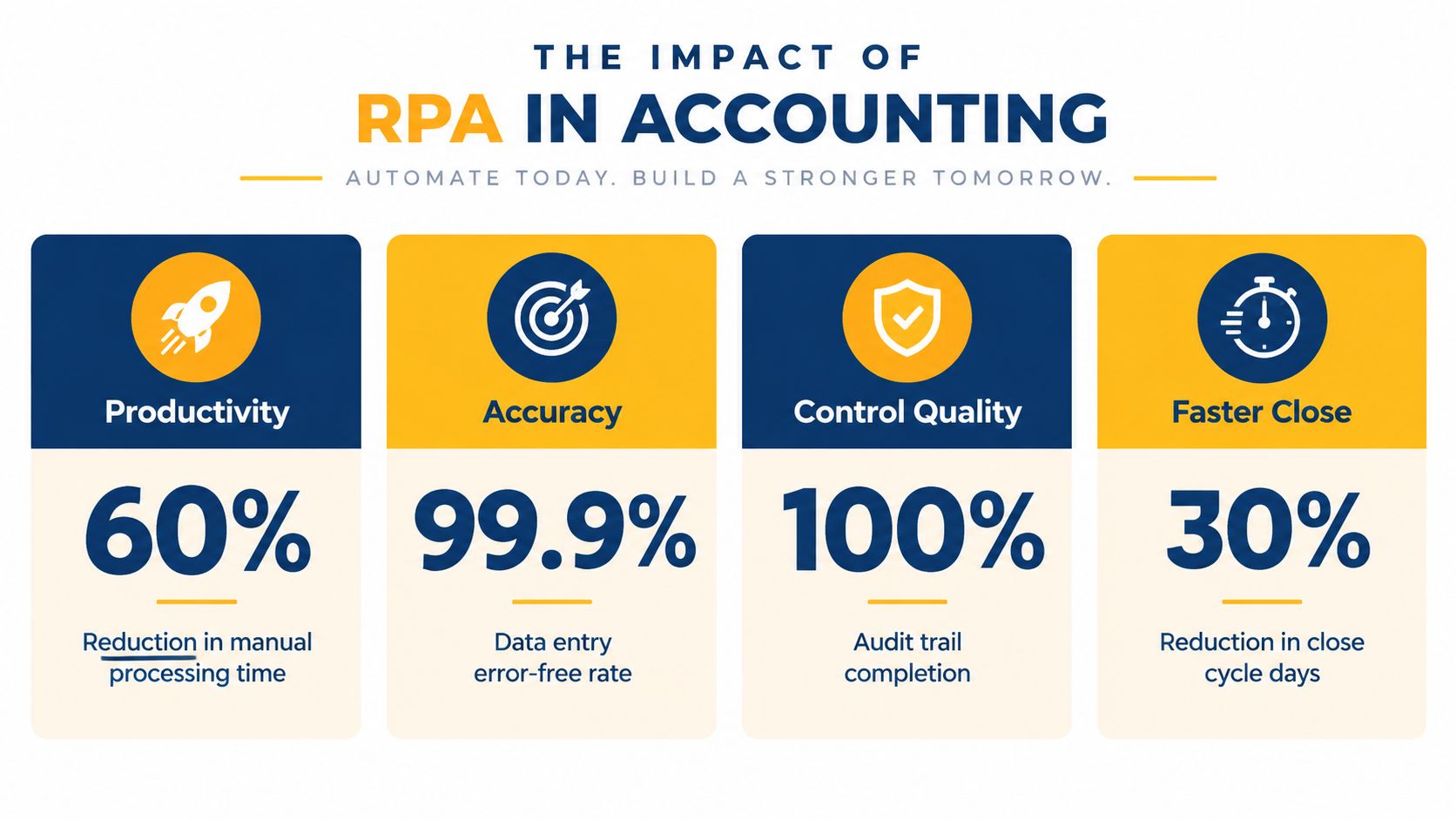
The adoption data points to an important conclusion. RPA is established enough to justify serious operational planning, but adoption alone doesn't prove that controls are working. To test the economics of a proposed workflow, finance and technology leaders can use an automation ROI calculator alongside their own volume, time and exception data.
Your Implementation Roadmap From Discovery to Monitoring
A bot should be the final expression of a well-understood process, not a quick patch over confusion. Start with the work as people perform it today, including the spreadsheets, inboxes, portals, approvals and manual decisions that aren't visible in the formal procedure.
1. Discovery
Choose a process owner from finance and document the current state. Record the trigger, every system touched, the data fields used, the approval points, the common exceptions and the fallback procedure if the bot fails.
A process map should answer a simple question: can another accountant follow the instructions without asking the original process owner for missing context? If not, the process needs clarification before development.
2. Prioritisation
Rank candidate processes by business value and feasibility. High volume and clear rules help, but so do stable systems, consistent data and a manageable risk profile.
A good first pilot is boring, visible and recoverable.
Avoid selecting a process only because senior leaders find it frustrating. A workflow may be painful because its policy is unclear, not because it needs a bot.
3. Design and build
Define the bot's permissions, queue behaviour, exception categories and logging requirements before configuring actions. Decide whether the bot will use an API, an existing connector or the user interface, based on the stability and governance of the environment.
Keep the workflow modular. A separate invoice-capture component, matching component and approval component is easier to test and change than one large sequence with hidden dependencies.
4. Testing and validation
Test normal transactions, missing data, duplicates, rejected approvals, system outages and unexpected formats. Use representative accounting data and have finance staff validate the results, not just technical teams.
Check that the bot produces an evidence trail showing inputs, actions, decisions and outcomes. Confirm that a human can pause, correct and restart the process without creating duplicate postings.
5. Monitoring and optimisation
Production is the beginning of operational ownership. Track completed items, failed runs, exception categories, processing times and manual overrides. Review the process after ERP changes, policy updates and supplier or customer workflow changes.
A practical business process audit can help identify where documented procedures, actual practice and automation controls have drifted apart. That review is particularly useful before expanding a pilot into other entities or accounting teams.
Integration Compliance Security and Change Management Essentials
RPA can cross application boundaries, but crossing boundaries doesn't remove the need for architectural discipline. Use an API or supported connector where it provides a stable, governed path. Use screen-based RPA where a legacy application or external portal leaves no practical alternative, then monitor the interface closely because a layout change can interrupt the bot.
Peppol eInvoicing deserves separate treatment in Australian designs. The Australian Government established the Australian Peppol Authority within the ATO in 2019, and the ATO says the Australian-New Zealand invoice specification supports GST and keeps eInvoices valid as tax invoices. Those details are set out in the ATO's explanation of Australian eInvoicing requirements.
Government adoption also creates a useful operating reference. All non-corporate Commonwealth entities have been required to be able to receive Peppol eInvoices since July 2022. The ATO began requesting eInvoice volume data from those entities in July 2024, and more than 80% were already reporting those volumes, according to the ATO's published material on Commonwealth eInvoicing.
Deterministic rules compared with AI-assisted review
| Deterministic RPA | AI-assisted exception handling |
|---|---|
| Checks known fields and rules | Interprets less structured information |
| Produces repeatable actions | Suggests a likely next action |
| Works well for exact matches | Helps classify or explain unusual cases |
| Needs clear stop conditions | Needs stronger review and monitoring controls |
Security starts with least-privilege access. Give a bot only the permissions needed for its assigned process, separate development and production credentials, protect secrets and require human approval for sensitive releases. Logs should capture the transaction reference, action taken, user or bot identity, exception reason and approval outcome.
Change management matters just as much. Staff need to know which decisions remain theirs, how to correct a bot result and who owns an incident. Finance leaders assessing ways to reduce manual compliance reporting work should still confirm that automated evidence meets their internal and regulatory requirements. A structured approach to system integrations can help align the ERP, banking platforms, Peppol access point and reporting tools rather than creating another isolated layer.
Measuring Success Avoiding Pitfalls and Taking the Next Step
Measure the workflow before and after automation using the same definitions. For accounts payable, track invoice cycle time, touchless completion, exception reasons and approval ageing. For reconciliations, track matched items, unresolved balances and review effort. For close, track the completion of scheduled tasks, journal review time and late adjustments.
The most common failure is automating a broken process. Other warning signs include unclear ownership, undocumented exceptions, excessive bot permissions, missing audit evidence and no recovery plan for system changes. A bot that processes routine items quickly but leaves a poorly managed exception queue may shift the workload rather than improve it.
Australian reporting highlights the maturity challenge. One recent summary said 86% of finance departments were using AI and 99% were using automation in some capacity, while only 30% reported AI as extensively or fully integrated and 38% reported the same for automation. The figures are presented in Australian reporting on finance automation maturity. The practical lesson is clear: broad use doesn't equal controlled scale.
Start with one process, document its rules, define the exception path, test the audit trail and assign an owner for monitoring. Osher Digital offers process automation, accounting workflow support and system integration services that can help finance teams assess legacy processes and connect tools across their operating environment. Speak with the AI consultants at Osher Digital when you're ready to turn a repeatable accounting workflow into a governed automation pilot.
Osher Digital can help map AP, AR, reconciliation and close processes, identify suitable RPA opportunities and design the human review points around them. Visit Osher Digital to discuss a practical automation plan for your accounting environment.
Last updated on October 28, 2026
Free tool · 2 minutes
Automation ROI Calculator
See what a manual process is really costing you, and the payback on automating it.
Continue Reading
View all
Robotic Process Automation Solutions for a More Efficient Business
Imagine you have a new team member who loves doing all the boring, repetitive tasks you hate. They can copy-paste data, fill out forms, and run reports all day long. The best part? They work 24/7, never need a coffee break, and never make a single typo. That’s pretty much what robotic process automation is… […]
Dec 13, 2025
What Is Robotic Process Automation? A Simple Guide.
The term ‘Robotic Process Automation’ brings up images of actual robots wandering around the office, making coffee and delivering mail. The reality, thankfully, is a lot less dramatic and way more useful. So What Is Robotic Process Automation? Imagine you had a team of super-efficient digital assistants. Software ‘bots’ that live inside your computer systems. […]
Nov 23, 2025
RPA for Finance: Streamline Financial Operations in 2025
Discover how RPA for finance transforms operations. This guide explores use cases, ROI, and implementation steps for Australian financial teams.
Jul 25, 2025
Sick of reading about automation?
Book a free 15-minute intro call. We’ll talk through what you’re trying to automate and whether we’re a good fit.