Skip to content

Medical practice automation for referrals, reports and results

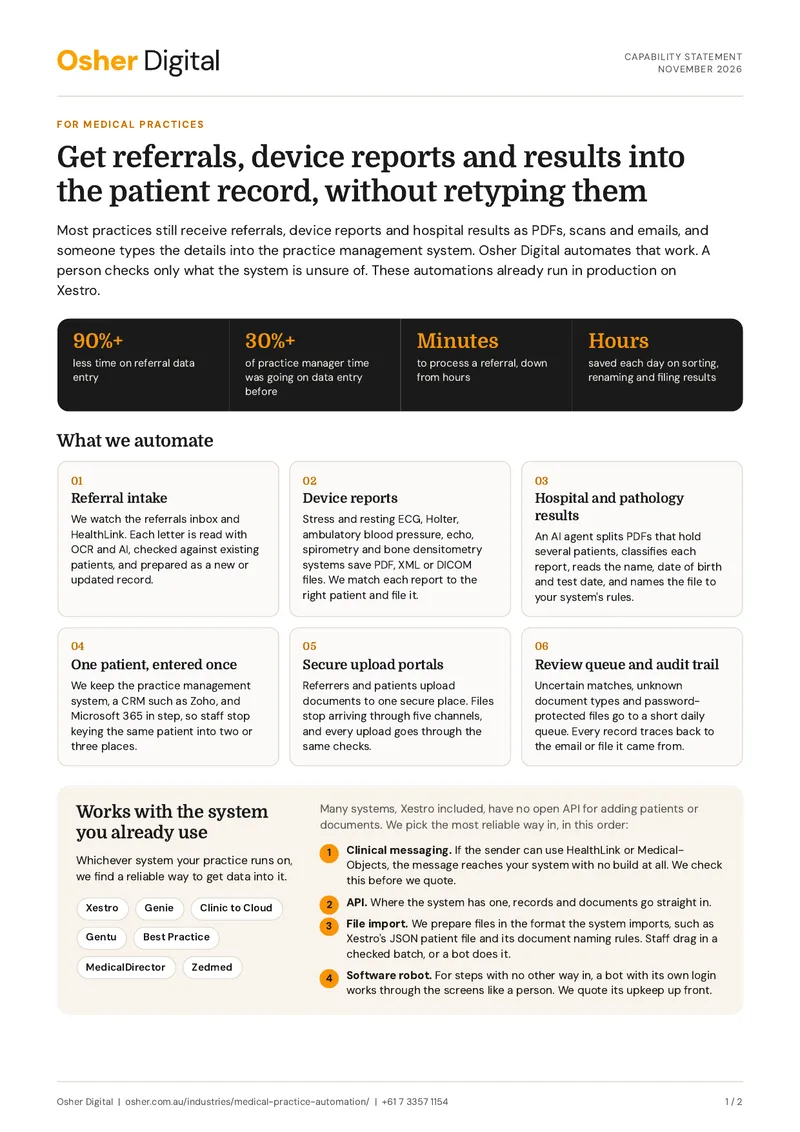
Referrals, device reports and hospital results still arrive as PDFs, scans and emails, and someone types them into the practice management system. We automate that work for specialist, GP and allied health practices. A person checks only what the system is unsure of.

Capability statement (PDF, 2 pages)

Referral data entry cut by more than 90% at a Melbourne specialist practice. Read the case study

How medical practice automation worksReferrals, ECG reports, hospital bundles and pathology results are read, matched to the right patient and filed. Your team checks any uncertain match, and the record lands in your practice management system.osher.com.auReferral letteremail or HealthLinkECG reportPDF and XMLHospital bundle3 patients, 1 PDFPathology resultlab PDFPractice automationreads, matches, filesPatient recordJane Citizen, 14-03-1968Referral filed, ECG attachedUncertain match checkedby your team, in a short queueIn your practice systemXestro, Genie, Best Practice

What we automate

The admin between the inbox and the patient record

Referral intake

We watch the referrals inbox and HealthLink. Each letter is read with OCR and AI, checked against existing patients, and prepared as a new or updated record.

Device reports

Stress and resting ECG, Holter, ambulatory blood pressure, echo, spirometry and bone densitometry systems save PDF, XML or DICOM files. We match each report to the right patient and file it.

Hospital and pathology results

An AI agent splits PDFs that hold several patients, classifies each report, reads the name, date of birth and test date, and names the file to your system's rules.

One patient, entered once

We keep the practice management system, a CRM such as Zoho, and Microsoft 365 in step, so staff stop keying the same patient into two or three places.

Secure upload portals

Referrers and patients upload documents to one secure place. Files stop arriving through five channels, and every upload goes through the same checks.

Review queue and audit trail

Uncertain matches, unknown document types and password-protected files go to a short daily queue. Every record traces back to the email or file it came from.

Practice management systems

Works with the system you already use

Whichever system your practice runs on, we find a reliable way to get data into it.

Systems we work with

  • Xestro
  • Genie
  • Clinic to Cloud
  • Gentu
  • Best Practice
  • MedicalDirector
  • Zedmed

Many systems, Xestro included, have no open API for adding patients or documents. We pick the most reliable way in, in this order:

  1. Clinical messaging. If the sender can use HealthLink or Medical-Objects, the message reaches your system with no build at all. We check this before we quote.

  2. API. Where the system has one, records and documents go straight in.

  3. File import. We prepare files in the format the system imports, such as Xestro's JSON patient file and its document naming rules. Staff drag in a checked batch, or a bot does it.

  4. Software robot. For steps with no other way in, a bot with its own login works through the screens like a person. We quote its upkeep up front.

Case studies

Examples from our healthcare work

Automating Patient Data Entry for a Medical Practice

A Melbourne-based medical practice, reduced manual data entry time by automating the processing of patient referrals received via email and Healthlink. Using n8n, OCR, and AI, patient data is extracted, formatted, deduplicated, and entered into Xestro and Zoho CRM.

AI Medical Document Classification for a Healthcare Practice

Statera Health, a medical practice in Melbourne, eliminated hours of daily manual document sorting and filing by implementing automated AI document classification. Osher Digital configured a solution that processes incoming medical documents, saving the practice hours daily on document handling, achieves consistent and accurate file naming, and has removed misfiled documents and related rework.

Automating Insurance Claims with an AI Agent

Strive Community Care is a Brisbane based NDIS registered provider and spent a massive amount of time preparing property damage insurance claims. Osher Digital automated the claim preparation drafting process with an AI Agent.

Beyond practices, we have worked with large medical software companies, including DoseMe and US-based Monarch Medical Technologies. Our US work was done under HIPAA, the US health privacy law.

Capability statement

The two-page version, for your practice manager or partners

What we automate, the systems we work with, our case studies and how a project runs, on two A4 pages.

Download the capability statement

PDF, 2 pages. No email needed. Or book a 15-minute call.

Privacy

Patient data stays in Australia

How we handle health information is written down in our help centre.

Where it runs

  • Workflows hosted on Australian servers
  • OCR and AI services in an Australian region
  • Designed for Australian Privacy Principle 8

Who checks

  • A person reviews any uncertain patient match
  • Fields the AI cannot read are left blank, not guessed
  • Clinical judgement is never automated

Access and records

  • Each bot has its own login and only the access it needs
  • Every action is logged
  • Each record traces back to its source email or file

How it works

How a project runs

  1. A 15-minute call

    Send a sample file and tell us where it lands today.

  2. A clear quote

    We tell you which method fits and what it costs, including upkeep.

  3. Built on your documents

    We map your formats and test with your past files before go-live.

  4. Go-live and tuning

    We train your team, set up the review queue and tune the system on real use.

Articles

Further reading for practices

FAQs

Medical practice automation questions, answered

Yes. We use the system's API where it has one. Where it does not, as with Xestro, we prepare files in the format it imports, or use a software robot for the steps with no other way in. We check first whether the sender can use HealthLink or Medical-Objects, because that route needs no build.

Xestro does not publish an API for creating patients or adding documents. It connects to selected services such as HealthLink, Medical-Objects, Services Australia and Tyro. Everything else reaches Xestro through file import, a person, or a software robot.

Most ECG, Holter, echo and bone densitometry systems save a PDF, often with XML or DICOM, to a folder or an inbox. An automation picks up each file, matches it to the right patient and prepares it for your practice management system. Structured XML exports need very little checking.

In Australia. We host workflows on Australian servers and use OCR and AI services that run in an Australian region, so patient data is not sent overseas without you knowing.

For structured device exports, very little. For referral letters and hospital bundles, yes, but only for the cases the system flags as uncertain. That short review step keeps duplicate and mismatched records out of the patient file.

Book a 15-minute call and send a sample file if you can. We tell you which method fits and what it will cost, before any work starts.

Testimonials

What a medical software client says

Nicola Hunter
“The team helped us automate our lead acquisition and sales process so we know what works and what doesn’t.”

Nicola Hunter

Senior VP at Monarch Medical Technologies

Stop retyping referrals

Book a free 15-minute call. Send a sample file, and we'll tell you which method fits and what it costs.

Australian-hostedPrivacy Act compliantNDAs standard