n8n vs Make: Which Workflow Tool Should You Build On?
Make and n8n look alike on the canvas and bill very differently. Where each one wins, what they cost as workflows grow, and how we move clients from one to the other.
By Matthew Clarkson · October 27, 2026
Make is n8n's closest competitor. Both use a visual canvas, both connect to thousands of apps, and both cost little at low volume. Choose Make when the person building the automations is not a developer, volumes are modest, and US or EU hosting is fine. Choose n8n when you want to host it yourself (in Australia, if the data is sensitive), when workflows have many steps or run often, or when you need real code and AI agents with the model of your choice.
We are Osher Digital, a Brisbane automation consultancy, and n8n is the tool we use most. We have moved clients from Make to n8n more often than the other way, usually because they wanted to self-host or because their Make bill grew with every step they added. That is our bias, so the facts below come from each vendor's own pricing and documentation, checked on 27 October 2026. If you run on Microsoft 365, our n8n vs Power Automate vs Make comparison adds the third option.
The two side by side
| n8n | Make | |
|---|---|---|
| What you pay for | Executions: one run of the whole workflow, however many steps | Credits: one per module operation for non-AI apps, so every step counts |
| Free option | Self-hosted Community Edition, no licence fee | Free plan with 1,000 credits a month |
| Entry paid plan | Cloud Starter, €20 a month on annual billing, 2,500 executions | Make Plan, US$9 a month on annual billing, 5,000 credits |
| Where data lives | n8n Cloud in Frankfurt, or self-hosted wherever you choose | US or EU data centres only, chosen when you create the organisation |
| Apps | More than 2,000 integrations | More than 3,500 |
| Code | Code node with JavaScript and Python on every plan | Make Code app with JavaScript and Python on paid plans |
| AI agents | AI Agent node with LangChain tools, memory and vector stores | Make AI Agent, in open beta on all plans |
| Error handling | Error workflows and per-node retries on every plan | Five error handlers; incomplete executions off by default |
| Licence | Sustainable Use License ("fair-code") for self-hosting | Hosted service only |
How each one bills, and why it matters
This is the difference that decides most projects. Make charges for each operation. n8n charges for each run.
Take a 12-step workflow that runs 880 times a month, about 40 times each working day. On Make that is roughly 10,500 credits a month, just past the 10,000-credit level Make shows Australian visitors at US$16 a month on annual billing. On n8n Cloud it is 880 executions, well inside Starter's 2,500.
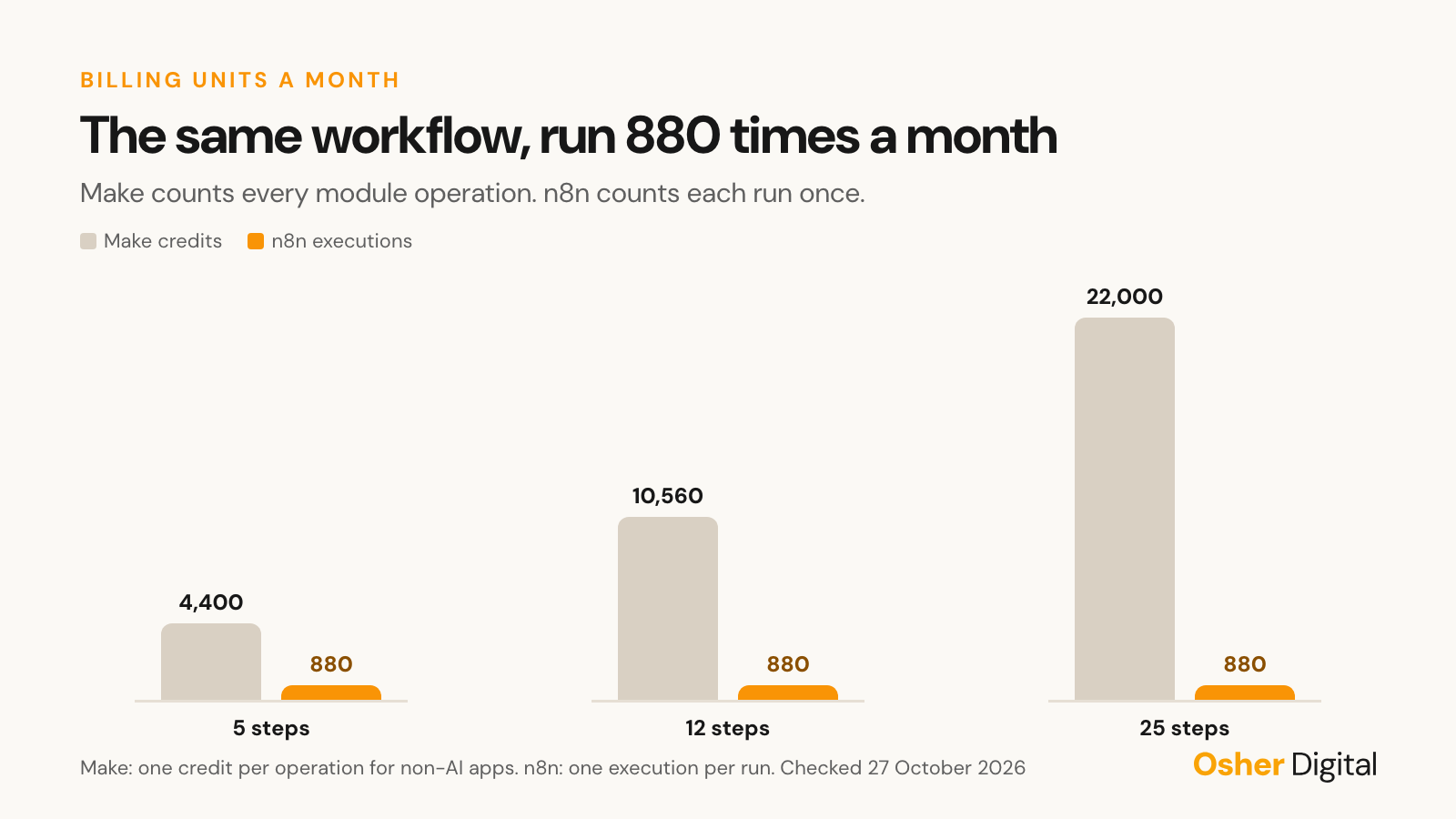
Now add steps. A workflow that grows from 12 to 25 steps doubles its Make credits and leaves the n8n execution count where it was. Loops have the same effect: when a Make iterator splits an array of 50 line items into 50 bundles, every module after it runs 50 times. On n8n the same 50 items flow through one execution.
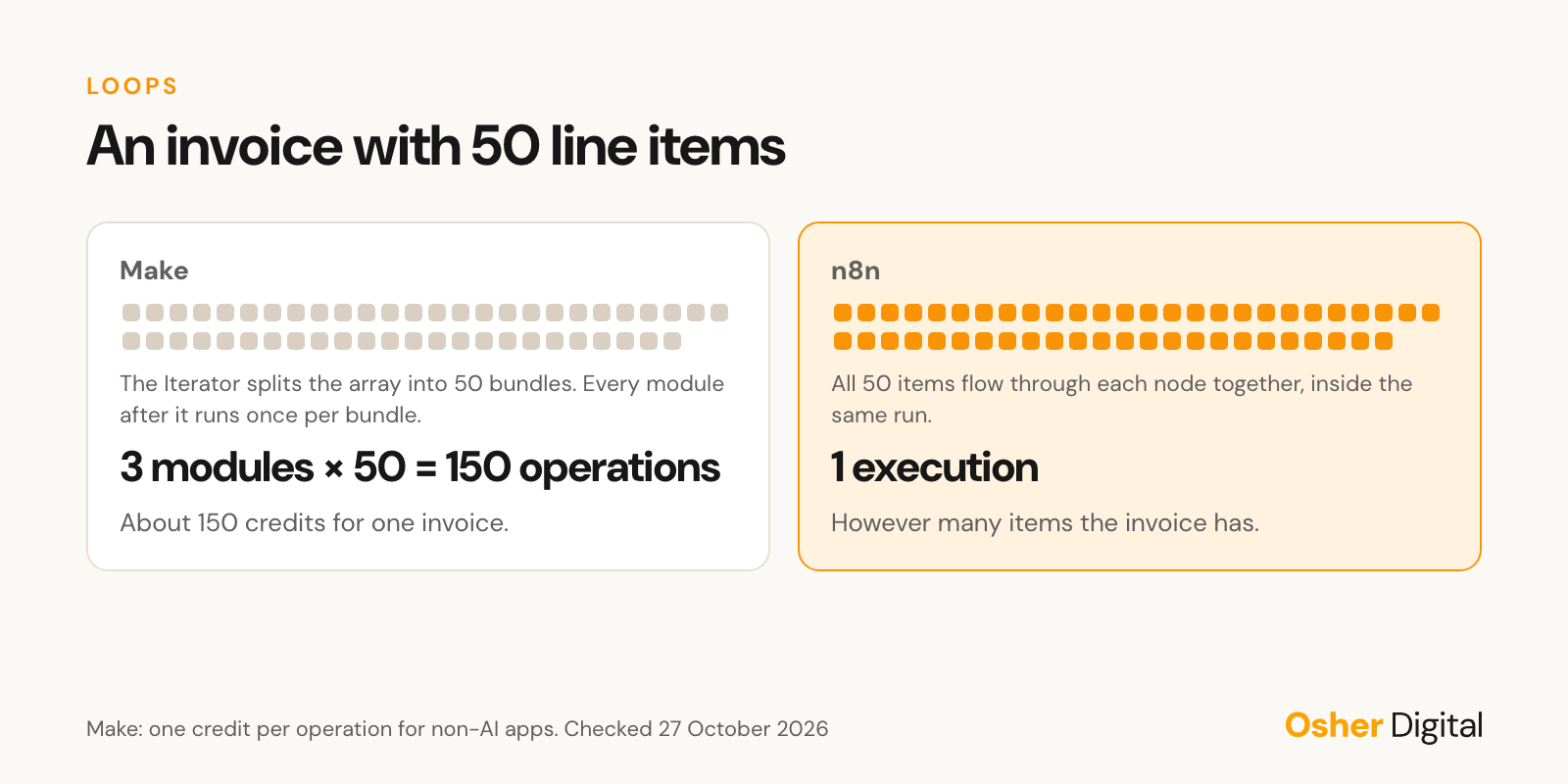
Make is not expensive for what most small teams do. It becomes expensive for long workflows, loops over large arrays, and anything that runs thousands of times a day. Make does make some things free: routers and error handler modules use no credits. AI modules on Make's own AI provider are charged by tokens, and modules on your own AI connection cost one credit per operation plus whatever the provider charges.
Where Make is better
Make deserves credit for several things we would not want to lose.
Arrays are clearer in Make. The Iterator turns an array into a series of bundles, and the Array aggregator merges bundles back into one, grouped by any value you choose. You can see exactly where the data splits and joins on the canvas. n8n handles arrays as items and is just as capable, but people new to it find Make's model easier to follow.
The canvas suits non-developers. Someone in operations or marketing can build, run and debug a Make scenario without reading JSON. That matters when nobody technical will own the automation.
There is nothing to host. Make is a hosted service with a large app library, so there is no server to patch, back up or monitor.
Where n8n is better
You can host it yourself. The Community Edition is free to self-host, so you can run it on an Australian server and keep personal information onshore. Make offers only its US and EU data centres, and its built-in AI assistant processes in the US even on EU zones. n8n Cloud itself is hosted in Frankfurt, so self-hosting is the option that matters for Australian data.
The Code node goes further. Make's Code app runs JavaScript and Python on paid plans, with a 30-second limit on Core, Pro and Teams and two credits per second of run time. n8n's Code node runs on every plan without a per-second charge. On n8n Cloud the Code node cannot import external libraries, but a self-hosted instance can allow npm modules and approved Python packages.
AI agents are more mature. n8n's AI Agent node works with LangChain tools, memory and vector stores, and you choose the model and pay the provider directly. n8n can also expose its workflows to AI clients through an MCP server trigger. Make's AI Agent is useful, but at the time of writing it is still in open beta.
Version control is easier. Every n8n workflow exports as JSON, which we keep in git on every plan, and the Business and Enterprise plans add built-in Git integration and separate environments.
Moving from Make to n8n
When a client asks us to move, the work follows the same pattern:
- List every scenario with its monthly credits, its owner and what breaks if it stops.
- Rebuild the few that use the most credits first. They produce most of the saving and show early whether n8n handles them well.
- Translate iterators and aggregators into n8n's item model, and replace Make's data stores with a proper database table where the data matters.
- Run old and new side by side for a full business cycle and compare the outputs before you switch Make off.
- Leave small, cheap scenarios on Make if rebuilding them costs more than it saves.
Set up monitoring and backups for a self-hosted n8n from day one, and back up the encryption key. Losing that key is the one mistake that is hard to recover from.
When to stay on Make
Stay on Make if the person who owns the automations is not technical, the workflows are short, volume is modest, and US or EU hosting is acceptable for your data. In that situation Make is a good tool and the cost of moving outweighs the saving.
Move to n8n when the credit bill grows faster than the business, when personal information needs to stay in Australia, or when the workflows need code or AI agents that Make's limits make awkward. Our n8n consultants build and host n8n on Australian servers, and our n8n review after three years in production covers what holds up and what does not. To talk through a specific migration, book a 15-minute call.
Frequently asked questions
Is Make the same as Integromat?
Yes. Integromat renamed itself Make in 2022. The product, its scenarios and its app library carried over.
Is n8n cheaper than Make?
For short workflows at low volume the two cost about the same. Because Make charges for every operation and n8n charges once per run, n8n gets cheaper as workflows grow longer or run more often. Self-hosted n8n has no licence fee at all, only the server and someone to maintain it.
Can I self-host Make?
No. Make runs only as a hosted service, in its US or EU data centres. If you need automation running on Australian infrastructure, self-hosted n8n is the usual choice.
Does Make still use operations?
Make now bills in credits. For non-AI apps one operation equals one credit, so the count works the same way as before. AI usage on Make's own AI provider is charged by tokens.
Last updated on October 27, 2026
Free tool · 1 minute
AI Agent Idea Generator
Describe a painful process and get concrete AI agent concepts for your industry.
Continue Reading
View all
n8n vs Temporal vs Prefect: Visual Workflows or Workflows as Code?
Temporal makes code durable, Prefect orchestrates Python pipelines, and n8n connects business systems visually. When each one is the right call, and how they work together.
Oct 27, 2026
n8n vs Activepieces: The Open-Source Alternative, Compared
Activepieces is the newest serious alternative to n8n, and its licence is the main reason to look. How the two compare on licence, pricing, integrations and AI agents.
Oct 27, 2026
How to Build a Powerful n8n Chatbot
A complete guide to building an n8n chatbot that works. Learn how to design, connect, and scale a powerful bot using LLMs, Slack, and WhatsApp integration.
Oct 26, 2025
Sick of reading about automation?
Book a free 15-minute intro call. We’ll talk through what you’re trying to automate and whether we’re a good fit.