Legal
97% Less Paralegal Time: AI CCTV Review for a Law Firm
AI now reviews 24 hours of CCTV a day for an Australian law firm. Paralegals check about 40 records a day instead of watching it all saving 97% of their time.
- Client
- An Australian law firm
- Location
- Australia
- Status
- Built October to November 2026 and currently crunching data.
97% less paralegal time
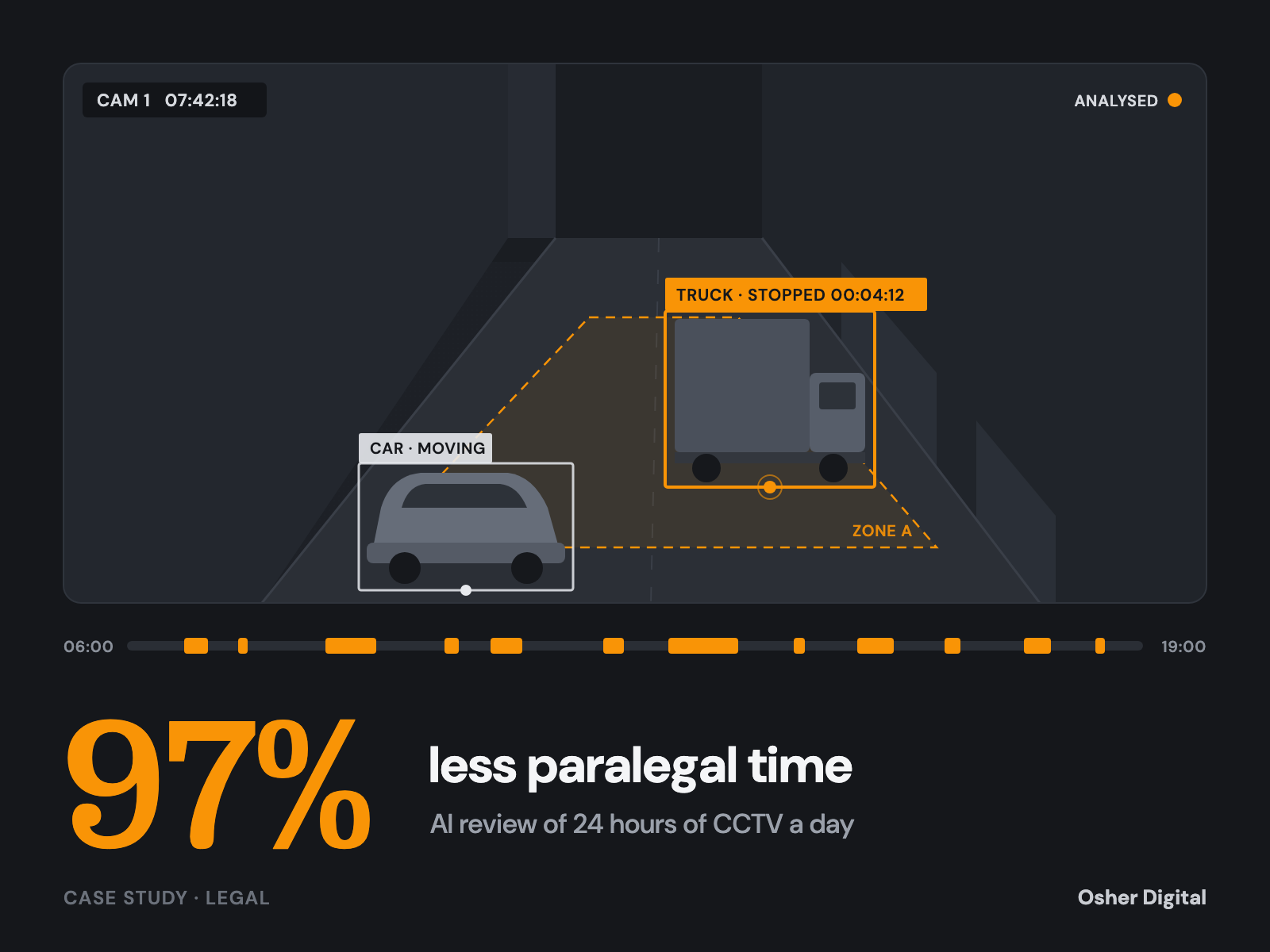
An Australian law firm needed a record of every vehicle that stopped or parked in shared access areas beside its client's site. The record is for a property dispute before the courts. Two solar-powered cameras watch those areas, and between them they record about 24 hours of video a day.
The first plan was for paralegals to watch all of it and log each stop by hand. Osher Digital built a system that watches the footage overnight instead. The paralegals now check the system's records, not the video.
| Paralegals watch all footage | With the system | |
|---|---|---|
| Daily task | Watch about 24 hours of video | Check about 40 records |
| Paralegal time each day | About 24 hours | About 40 minutes |
| Paralegal time each month | About 730 hours | About 22 hours |
| 50 days of older footage | About 650 hours | A few nights of processing, then review |
That is about 708 fewer paralegal hours every month, or more than four full-time staff who can go back to legal work.
The result
What changed
97% less paralegal time
About 22 hours of checking a month, down from about 730 hours of watching video.
About 708 hours back every month
That is more than four full-time paralegals freed for legal work.
A minute per record, not an hour per hour
Every row opens the footage about ten seconds before the stop, so a reviewer confirms it and moves on.
90% of frames never reach the detector
Change gating skips frames where nothing moved, so one camera-day runs in about 70 minutes on a four-core CPU server.
How we worked out the 97%
The figure comes from the firm's own numbers, not from a vendor benchmark.
Watching everything. The firm's checking guide sets the pace at one hour of work for each hour of footage. Reviewers can run quiet stretches at double speed, but they have to stop and step back to read the exact second a vehicle arrives and leaves. That gains back very little. With about 24 hours of footage a day, the month comes to 24 × 30.4 = about 730 hours.
Checking records. Over four sample days the two cameras produced about 160 records, or about 40 a day. Each record has a link that opens the video about ten seconds before the moment. At about a minute a record, that is 40 minutes a day, or about 20 hours a month. One sampled hour per camera each month, watched in full to catch misses, adds 2 hours. Total: about 22 hours.
The saving. 22 hours is 3% of 730 hours, so the firm saves about 97%.
These are estimates. The firm received its first review workbooks in November 2026, and we will update this page with the measured time per record. There is also a one-off accuracy check of about 48 hours at the start (see below). Even counted in full, it is paid back in about two days of savings.
The problem with watching
Time was not the only issue. Hour after hour of an almost empty access way is exactly when a tired reviewer misses a two-minute stop. Hand-written logs also vary from person to person: one reviewer starts a stop when the wheels stop, another when the driver gets out.
For the record to hold up, every entry needs the same rules, an exact start and end time, and a way for anyone to check it against the video.
How it works
The system is a Python batch job. It runs every night on a server in Australia and reads from and writes to the firm's own SharePoint. There is no web app and no live monitoring. Each night it works through the previous day's footage in six stages.
1. Ingest
New clips come from the firm's SharePoint evidence library through Microsoft Graph. The system can read the evidence library but cannot change it. Each clip is fingerprinted with SHA-256 and registered once, even if someone uploads it twice. A coverage ledger compares the minutes recorded with the minutes expected, so gaps in the footage are known before any analysis starts.
2. Timing from the video itself
The cameras use a variable frame rate: slow when nothing moves, faster when something does. Counting frames would give the wrong time. So PyAV decodes each clip and reads every frame's presentation timestamp (PTS). Every time in the register comes from those timestamps.
The system considers a frame every half second, which is about 94,000 frames per camera-day.
3. Skipping frames where nothing changed
Most of the day, nothing happens. Each frame is shrunk to 224 pixels wide, turned to greyscale and compared with the last frame analysed, inside the marked areas only. Brightness is evened out first, so a passing cloud does not count as a change. If nothing changed, the frame is skipped, but a parked vehicle is always looked at again within 10 seconds.
On a test day this cut about 94,000 frames to about 9,500 detector runs. That 90% cut is what makes CPU-only processing affordable.
4. Finding and following vehicles
RF-DETR Large, a transformer-based object detector, finds cars, trucks, buses and motorcycles in each remaining frame. It also counts people inside each area. Person boxes are then thrown away, so no one is tracked or described. A mask hides fixed objects, such as pallet stacks, that the detector would otherwise call trucks.
ByteTrack links the detections into a track for each vehicle. A vehicle is "in" an area when the bottom-centre of its box, roughly where the wheels meet the ground, is inside the area drawn on the camera image. Movement is measured over the last 3 seconds and divided by the box height, so a car near the camera and a truck far away are judged on the same scale.
A stop starts when a vehicle has been still in the area for 30 seconds. The start time is set back to the first still moment, not the 30-second mark. The stop ends when the vehicle moves for more than 5 seconds, leaves, or is lost for more than 10 seconds.
Then the clean-up:
If a truck drives in front of a parked car, the two halves of the stop are joined back into one record.
A stop that runs past midnight keeps one ID.
A vehicle seen by both cameras is one stop, not two.
5. Describing each stop
For each finished stop, the system takes key frames at arrival, stop, departure and every 90 seconds between, with a crop around the vehicle. The frames go to Claude Sonnet 5 at their original resolution. They are never enlarged, so the model cannot be shown detail the camera did not record.
The model answers in a fixed JSON schema. It gives the vehicle type, an estimated Austroads class for heavy vehicles, the activity (loading, unloading, parked, waiting) and whether a forklift was present. It also confirms whether two joined halves of a stop really are the same vehicle. A plate guard checks every text field against Australian number plate formats and blanks any match. The system never records plates.
6. Publishing
The register goes to the firm's SharePoint as a spreadsheet, one row per stop, with a video link on every row. Each stop also gets an evidence folder: the frames, the crops, the model's answer and a manifest of SHA-256 fingerprints. Every upload is read back and checked.
Each record gets a review tier based on signals such as night footage, a partial view or a split track. Tiers decide what to check first. They never hide a record.
Every night the system also runs two checks on the cameras themselves:
A camera-shift check matches fixed features in the scene against reference frames. It flags any movement over 4 pixels or 0.5 degrees, because a moved camera means the marked areas no longer line up.
The time printed on the picture is read with a digit matcher and compared with the file's timestamp. Any difference over 2 seconds is flagged.
Built for evidence
A register is only as good as the record of how it was made.
The source video is never moved, edited or deleted.
The run log is hash-chained: each entry includes the fingerprint of the one before, so a changed line breaks the chain.
Logs, results and the full dataset are copied to the firm's SharePoint each night and checked.
Detection is deterministic: the same clip on the same machine gives byte-identical output.
Where the camera did not record, the register shows a gap instead of a guess.
Where a vehicle was hidden for a time, its arrival or departure is given as a range, not a single time.
Osher describes the process and produces records that can be checked. The firm and counsel decide how those records are used.
How the firm checks the results
Reviewing the system's records shows wrong entries. It does not show missed ones. So the firm's staff also watch sampled full hours of footage, up to about 24 hours per camera, across weekdays, a Saturday, night and poor weather, and log every stop themselves. Comparing their logs with the register measures how many stops the system misses. That is the one-off 48 hours mentioned above.
After that, the monthly sampled hour per camera keeps the check going.
Where it stands
The system is built and has run on real footage from both cameras. Stop records have matched the video on the days we checked ourselves. Parking records are harder: vehicles stay for hours, trucks pass in front of them and the light changes through the day. That part is still being tuned.
The firm's accuracy checks started in November 2026. Nightly runs start when those checks are done.
If your firm needs legal automation, we can help. See how we approach custom AI development and automated data processing.
What it is built on
- PyAV
- Decodes each clip and takes every time from the frame's presentation timestamp
- RF-DETR Large
- Transformer-based detector that finds vehicles in each frame, on CPU
- ByteTrack
- Links detections into one track per vehicle
- OpenCV
- Change gating, camera-shift check and on-screen clock reading
- Claude Sonnet 5
- Describes each finished stop in a fixed JSON schema
- Microsoft Graph and SharePoint
- Read-only access to the evidence library; registers and evidence folders written back
- Python and Docker on an Australian server
- Nightly batch run with a hash-chained run log and alerts