Structural and Civil Engineering
A Pay-to-Release Report Portal for an Engineering Consultancy
This engineering consultancy emailed its reports, drawings and Xero invoice together, so clients had the work before they had a reason to pay. Osher Digital built a portal that reads the invoice, shows the client a DRAFT-stamped preview, and releases the clean files as soon as the invoice is paid in Xero.
- Client
- An Adelaide engineering consultancy
- Location
- Adelaide, SA
- Status
- Phase 1 built October 2026
- Volume
- 30 to 50 completed jobs a month
- Kept as is
- Total Synergy for jobs, Xero for invoices
- Engagement
- Fixed-price Phase 1, signed September 2026
The problem
The client is a structural and civil engineering firm with offices in Adelaide, Brisbane and Port Lincoln. Builders, architects and homeowners engage them for footing designs, structural inspections, stormwater plans and compliance certificates. Thirty to fifty of those jobs finish each month.
When a job finished, everything went out together: the PDF report, the CAD drawings, the Revit model and the Xero invoice. The client got the work and the bill in one email. Once a builder has the footing plan, there is little reason to pay this week rather than next month.
The director's brief was short. Make it as simple as WeTransfer. Send a link, the client pays, the files unlock. And leave Total Synergy, where the jobs live, and Xero, where the invoices live, exactly as they are.
The result
What changed
| What | Before | After |
|---|---|---|
| When the files go out | With the invoice | After payment |
| What the client sees before paying | Everything | A DRAFT preview and the list of files |
| Amount on the client's page | Typed by hand | Read from the Xero invoice |
| "We've paid" | An email to whoever is around | A notice on the job, sent to accounts and the engineer |
| Releasing the files | Already released | Automatic when the invoice is paid in Xero |
When the files go out
Before: With the invoice
After: After payment
What the client sees before paying
Before: Everything
After: A DRAFT preview and the list of files
Amount on the client's page
Before: Typed by hand
After: Read from the Xero invoice
"We've paid"
Before: An email to whoever is around
After: A notice on the job, sent to accounts and the engineer
Releasing the files
Before: Already released
After: Automatic when the invoice is paid in Xero
How it works
What we built
01
Upload once and let the invoice do the typing
An engineer drops the Xero invoice and the deliverables onto one page. The portal works out which PDF is the invoice and reads the amount due, the invoice number, the client, the job title and every client email printed on it.
Text rules do most of the work, because the firm's invoices all come from one Xero template. When the rules cannot find an amount, Claude Haiku reads the invoice instead, including scanned invoices with no text layer. Each file is read once and the result is stored against it. Every AI call is logged with its cost.
A person still confirms the amount before anything is sent. Fields filled from the invoice are labelled "From invoice" until someone edits them, so it is always clear what the software decided and what a person checked.
Then the engineer copies the link into their usual email, or sends it from the portal.
Drop the invoice and the reports. The portal finds the invoice and reads the amount and job title. 02
A DRAFT stamp you cannot inspect away
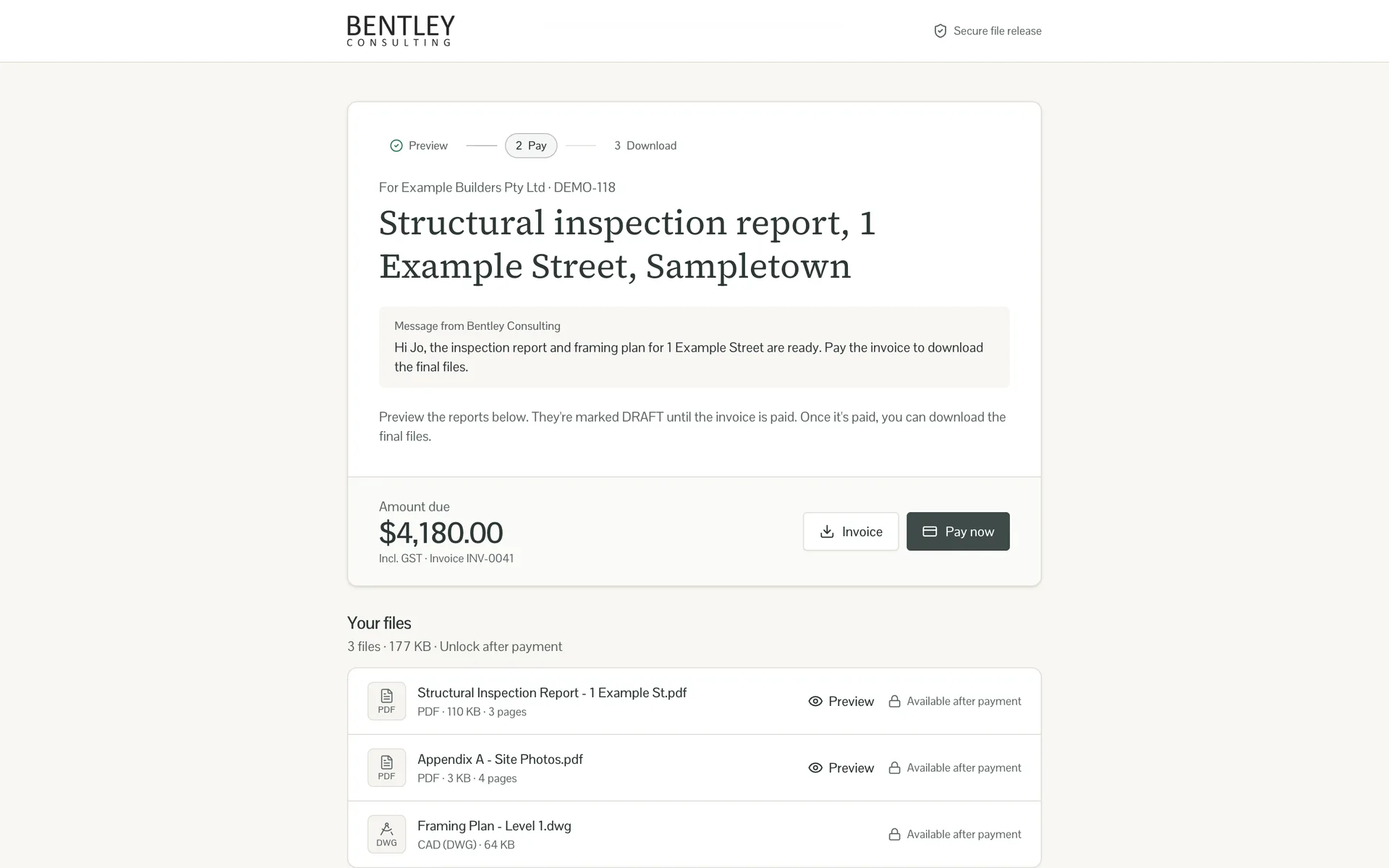
The client opens the link and sees what they are paying for: the amount due, the files, and a preview of each report with DRAFT across every page.
The stamp is applied on the server when the job is saved. The portal reads each page's size and rotation, builds an overlay and merges it into a copy of the PDF. The client's browser only ever receives that copy. A watermark drawn by the browser over the clean file can be removed by anyone who knows where to right-click, so we did not build one.
Real reports are messy. When a page in a PDF is partly damaged, the stamper keeps the part that reads and still stamps the copy. The original is never touched.
CAD drawings and Revit models cannot be previewed in a browser, so they show with a padlock until payment. Every file sits in a private Cloudflare R2 bucket. Each preview and download goes through the portal, which checks the job and then issues a link that expires after five minutes.
Reports preview with DRAFT on every page, stamped on the server before the client sees them. 03
The payment step changed mid-build
The plan was Stripe on the portal. The client pays by card, a webhook confirms it, the files unlock straight away. Then Australia's ban on card surcharges took effect on 1 October 2026, the same week as the build. Card fees could no longer be passed on to the client, and the firm did not want to absorb them on every invoice.
So bank transfer became the default. The pay dialog shows the firm's account details with the invoice number as the reference, each with a copy button. After paying, the client clicks "I've paid by bank transfer" and enters the date, the amount and, if they like, a remittance. That emails the firm's accounts inbox and the engineer who sent the link, and puts a notice on the job.
The notice does not unlock anything. Only a confirmed payment does.
Pay now shows the bank details, with the invoice number as the reference. 04
Paid in Xero, files released
The firm's payments are recorded in Xero anyway. A client can pay a Xero invoice by card through Xero's own payment link, and bank transfers are reconciled there. So the portal asks Xero.
It has a read-only connection to the firm's Xero organisation. When an invoice changes, Xero sends a signed webhook and the portal checks that invoice within seconds. If Xero says it is paid in full, the job unlocks and the client receives an email saying the final files are ready. A check every ten minutes catches anything a webhook missed.
The webhook itself is never trusted. It only tells the portal which invoice to look up, and the answer always comes from Xero. Anything unclear goes to a person instead: two jobs with the same invoice number, a part payment, a voided invoice or a revoked link. Staff can still click Mark as paid at any time, and if Xero and a person pay the same job at once, it is paid once and the client gets one email.
Paid in Xero: downloads unlocked and the files-ready email sent, with nobody clicking anything. 05
The office view
The dashboard answers the questions accounts actually ask. How much is waiting on payment? Which links has the client not opened yet? How long are clients taking to pay? Each job keeps a timeline: link created, opened by the client, remittance received, paid in Xero, files-ready email sent.
Engineers see their own jobs and admins see all of them. Nobody can sign up. Staff join by invitation. Osher has its own view of the Xero connection: the last check, the last webhook, and any job that needs a person.
The dashboard: money waiting, links not yet opened and average time to pay.
Two decisions worth stealing
Stamp on the server, not in the browser
If the clean file reaches the client's computer before payment, the DRAFT is decoration.
A message that says "paid" is not a payment
That goes for the client's "I've paid" form and for Xero's webhook alike. Files are released only when the portal has checked the payment itself, or a person has. Because that rule was there from day one, adding Xero meant one more way to confirm a payment, not a redesign.
What we left out on purpose
Phase 1 is the smallest thing that fixes the payment problem. There is no Total Synergy integration, no client logins and no report generation. Clients open a link and that is all.
Xero is the one connection, and it only reads. The portal asks whether an invoice is paid and changes nothing in Xero. Bank feeds and reconciliation stay where they were, with the firm's accounts team.
See it
Every screen
Open a section to browse it. Click any screenshot to enlarge.
These screens come from a demo account. Every client, job, document and bank detail in them is invented.
FAQs
Frequently asked questions
What it is built on
- Rails 8
- Application server, PostgreSQL and Solid Queue
- React 19 and Inertia.js
- Typed frontend
- Tailwind CSS and shadcn/ui
- Interface system, styled to the firm's brand
- Xero API
- Read-only custom connection: signed webhooks plus a check every ten minutes
- Cloudflare R2
- Private file storage, direct browser uploads and five-minute signed links
- qpdf and pdf-reader
- Server-side DRAFT stamping of every page
- PDF.js
- In-browser preview of the stamped reports
- Claude Haiku 4.5
- Fallback invoice reading through OpenRouter, with every call and its cost logged
- Coolify and Docker
- Deployment on a dedicated server